<?xml version="1.0" encoding="utf-8"?><feed xmlns="http://www.w3.org/2005/Atom" xml:lang="en-US"><generator uri="https://jekyllrb.com/" version="4.4.1">Jekyll</generator><link href="https://nitrocode.sh/feed.xml" rel="self" type="application/atom+xml" /><link href="https://nitrocode.sh/" rel="alternate" type="text/html" hreflang="en-US" /><updated>2026-08-16T13:51:43+00:00</updated><id>https://nitrocode.sh/feed.xml</id><title type="html">Alex Idowu</title><subtitle>Co-founder &amp; CTO at PipeOps. Platform engineering, multi-tenant Kubernetes isolation, agent sandboxes, cloud-native security, and production field notes from Lagos. Building Aeon.</subtitle><author><name>Alex Idowu</name><email>alexidowu25@gmail.com</email></author><entry><title type="html">Agents Do Better When Work Lives on a Board</title><link href="https://nitrocode.sh/blog/2026/08/16/agents-do-better-when-work-lives-on-a-board" rel="alternate" type="text/html" title="Agents Do Better When Work Lives on a Board" /><published>2026-08-16T00:00:00+00:00</published><updated>2026-08-16T00:00:00+00:00</updated><id>https://nitrocode.sh/blog/2026/08/16/agents-do-better-when-work-lives-on-a-board</id><content type="html" xml:base="https://nitrocode.sh/blog/2026/08/16/agents-do-better-when-work-lives-on-a-board"><![CDATA[<p>Most agent harnesses ship a todo list. Checkboxes in the chat, a side panel, something that looks like progress while the session is alive.</p>

<p>From my experience using AI heavily: <strong>relying on that internal list for a real workstream gets hard to manage and track.</strong> An external todo system is often easier to govern. The agent has also tended to do better when work is expressed as <strong>issues on the repo you’re in</strong> - plan the product as a project on a board, put goals and breakdown there, and let the agent pick cards instead of inventing a private backlog every session.</p>

<p><strong>TL;DR:</strong> This is an observation, not a rule. Harness todos still help for short in-session steps. For longer arcs I’ve gotten more stable results when planning and ownership live outside the chat - preferably on the forge you already use for code.</p>

<hr />

<h2 id="what-ive-been-doing">What I’ve been doing</h2>

<p>Create a project board for what you’re shipping (org-level if several repos share one product). Write the summary once: problem, goals, non-goals, constraints, what “done” means. Break that into issues with enough acceptance criteria that something can actually finish. Point the agent at the board - next Ready item, implement <code class="language-plaintext highlighter-rouge">#142</code>, triage bugs labeled for it. Land via PR. Reviews, CI failures, and product follow-ups go back to issues so the next turn (same agent or another) still has a durable queue.</p>

<p>Other project tools work - Linear, Jira, Notion, whatever your team already has. What I’ve noticed with <strong>native issues + projects next to the code</strong> is less glue: stable IDs (<code class="language-plaintext highlighter-rouge">#142</code> survives chats), PRs and CI sit beside the task, humans and agents share one surface, and you spend fewer tokens re-explaining state every session. You’ve moved planning and management of what you’re building onto a board both of you can track, correlate, and pull context from.</p>

<p>Harness todos still have a job. Mid-issue micro-steps (“run tests,” “update the readme”) are fine as ephemeral checkboxes. They die with the session; the issue doesn’t. For a twenty-minute drive that never needs a second agent or a tomorrow-morning resume, the built-in list is often enough and a board is overhead.</p>

<p>This can be countered. If your work is small, solo, and finishes in one chat, external process is ceremony. If the board is theater - everything In progress, novel-length issues, no review - you just moved the mess. Some people keep a clean harness workflow and never miss a forge board. Fair. I’m not arguing universality. I’m saying <strong>for multi-session, multi-PR work, the durable queue has been the part that held up for me</strong> - and reviews still matter; the issues page is just a convenient attention surface when something needs a human or a second pass.</p>

<p>The agent still lives in the terminal (ideally a sandbox - <a href="/blog/2026/08/11/how-to-safely-give-ai-agents-a-terminal">How to Safely Give AI Agents a Terminal</a>). The board is optional infrastructure for remembering what “done” was supposed to mean after the chat is gone.</p>]]></content><author><name>Alex Idowu</name><email>alexidowu25@gmail.com</email></author><category term="Agents" /><category term="Workflow" /><category term="GitHub" /><category term="Productivity" /><category term="AI" /><category term="Platform Engineering" /><summary type="html"><![CDATA[Observation from heavy agent use: harness todos are fine as a scratchpad, but durable work has been more stable on external boards - especially GitHub Issues and Projects next to the code.]]></summary><media:thumbnail xmlns:media="http://search.yahoo.com/mrss/" url="https://nitrocode.sh/assets/images/nitrocode-og-v2.png" /><media:content medium="image" url="https://nitrocode.sh/assets/images/nitrocode-og-v2.png" xmlns:media="http://search.yahoo.com/mrss/" /></entry><entry><title type="html">How to Safely Give AI Agents a Terminal</title><link href="https://nitrocode.sh/blog/2026/08/11/how-to-safely-give-ai-agents-a-terminal" rel="alternate" type="text/html" title="How to Safely Give AI Agents a Terminal" /><published>2026-08-11T00:00:00+00:00</published><updated>2026-08-11T00:00:00+00:00</updated><id>https://nitrocode.sh/blog/2026/08/11/how-to-safely-give-ai-agents-a-terminal</id><content type="html" xml:base="https://nitrocode.sh/blog/2026/08/11/how-to-safely-give-ai-agents-a-terminal"><![CDATA[<p>AI agents need a terminal to be useful. Giving them yours is a bad idea.</p>

<p>Most setups still do the dangerous thing by default: <strong>run model-generated commands on a machine you care about</strong>.</p>

<p>Laptop. Dev VM. Shared CI runner. Sometimes worse.</p>

<p>I hit this while building and testing CLIs and agents. The moment you let a model shell out - <code class="language-plaintext highlighter-rouge">npm install</code>, <code class="language-plaintext highlighter-rouge">curl | bash</code>, “fix the Dockerfile,” “explore the filesystem” - you’re no longer doing chat. You’re doing <strong>untrusted remote code execution</strong> with a friendly UI.</p>

<p><strong>TL;DR:</strong> Treat agent execution as an isolation problem, not a prompt problem. Prefer disposable Linux terminals that are network-isolated, resource-capped, and sandboxed with <strong>gVisor (<code class="language-plaintext highlighter-rouge">runsc</code>)</strong>. Outbound-only BYOS access is a separate path when you need real hardware. That model is what I designed into <a href="https://github.com/PipeOpsHQ/Rexec">Rexec</a>.</p>

<p>Related background: <a href="/blog/2026/02/27/rexec-terminal-control-room">Rexec as a terminal control room</a>.</p>

<hr />

<h2 id="the-wrong-default">The wrong default</h2>

<p>Teams adopt agent tooling like this:</p>

<ol>
  <li>Install agent CLI on a developer machine or bastion.</li>
  <li>Point it at a repo.</li>
  <li>Grant shell / network / package install.</li>
  <li>Hope system prompts and “approve tool use” are enough.</li>
</ol>

<p>Hope is not a control.</p>

<p>Models are good at <em>sounding</em> careful and still doing something catastrophic:</p>

<ul>
  <li>Writing secrets into world-readable files</li>
  <li><code class="language-plaintext highlighter-rouge">rm -rf</code> with a creative path expansion</li>
  <li>Exfiltrating env vars over DNS or HTTPS</li>
  <li>Installing packages that phone home</li>
  <li>Touching production kubeconfigs sitting in <code class="language-plaintext highlighter-rouge">~/.kube</code></li>
</ul>

<p>Even without malice, agents are sloppy operators. They thrash package managers, leave half-broken state, and burn hours on “works in the agent’s world / broken in yours.”</p>

<p>If the blast radius is your primary workstation, every session is a production incident waiting for a bad completion.</p>

<hr />

<h2 id="what-sandbox-the-agent-actually-has-to-mean">What “sandbox the agent” actually has to mean</h2>

<p>A sandbox for interactive <em>humans</em> and a sandbox for <em>agents</em> share plumbing, but agents change the threat model:</p>

<table>
  <thead>
    <tr>
      <th>Concern</th>
      <th>Human terminal</th>
      <th>Agent terminal</th>
    </tr>
  </thead>
  <tbody>
    <tr>
      <td>Intent</td>
      <td>Usually intentional</td>
      <td>High volume, exploratory, error-prone</td>
    </tr>
    <tr>
      <td>Speed</td>
      <td>Seconds between commands</td>
      <td>Bursts of tool calls</td>
    </tr>
    <tr>
      <td>Oversight</td>
      <td>Eyes on the glass</td>
      <td>Often headless / API-driven</td>
    </tr>
    <tr>
      <td>Network</td>
      <td>User expects outbound</td>
      <td>Agent <em>will</em> try outbound unless blocked</td>
    </tr>
    <tr>
      <td>Lifecycle</td>
      <td>Hours to days</td>
      <td>Should be minutes, then deleted</td>
    </tr>
  </tbody>
</table>

<p>So the requirements I care about:</p>

<ol>
  <li><strong>Disposable by default</strong> - create, run, destroy. No “that container from last Tuesday.”</li>
  <li><strong>Hard resource bounds</strong> - CPU, memory, PIDs; disk when the host can enforce it.</li>
  <li><strong>Network isolation as a first-class switch</strong> - not “we’ll add NetworkPolicy later.”</li>
  <li><strong>API/headless entry</strong> - agents shouldn’t need a human clicking xterm for every step.</li>
  <li><strong>Auditability</strong> - session recording / logs when you’re debugging “what did it do?”</li>
  <li><strong>No inbound SSH theater</strong> - prefer outbound tunnels when attaching real machines.</li>
</ol>

<p>This is platform engineering, not vibes: terminals become <strong>infrastructure primitives</strong> with create/delete semantics, quotas, and a control plane.</p>

<hr />

<h2 id="how-the-isolation-model-works">How the isolation model works</h2>

<p>I implemented this as two primitives in Rexec. You can copy the shape even if you never run our code.</p>

<h3 id="primitive-1-cloud-terminals-as-sandboxed-containers">Primitive 1: Cloud terminals as sandboxed containers</h3>

<p>Each session is a Linux environment backed by Docker/Podman, with <strong>gVisor</strong> in the isolation path:</p>

<ul>
  <li>Hard <strong>CPU / memory / PID</strong> limits</li>
  <li>Optional disk quotas when the host supports them</li>
  <li><strong>Dropped capabilities</strong> + <code class="language-plaintext highlighter-rouge">no-new-privileges</code></li>
  <li>Attachment to an isolated bridge (<code class="language-plaintext highlighter-rouge">rexec-isolated</code>) with <strong>inter-container communication disabled</strong></li>
  <li><strong>OCI runtime <code class="language-plaintext highlighter-rouge">runsc</code> (gVisor)</strong> so guest syscalls hit a user-space kernel, not the full host surface by default</li>
</ul>

<p>Rexec wires this as a first-class isolation choice (<code class="language-plaintext highlighter-rouge">OCI_RUNTIME=runsc</code>), not a footnote. Don’t leave untrusted code on stock <code class="language-plaintext highlighter-rouge">runc</code> and call it a day. More product context: <a href="/blog/2026/02/27/rexec-terminal-control-room">Rexec control-room post</a>.</p>

<p>Conceptually:</p>

<div class="language-plaintext highlighter-rouge"><div class="highlight"><pre class="highlight"><code>Agent / CLI / UI
 │ (API or WebSocket)
 ▼
 Control plane ──create/exec/delete──► Container runtime
 │
 ├─ cgroup limits
 ├─ dropped caps
 ├─ isolated network bridge
 └─ gVisor (runsc) application kernel
</code></pre></div></div>

<p>The important product decision: <strong>the environment outlives a single WebSocket flap, but not your interest in it.</strong> Interactive UX can reattach via <code class="language-plaintext highlighter-rouge">tmux</code>/<code class="language-plaintext highlighter-rouge">exec</code>; the <em>security</em> unit is still “this sandbox, this network, these limits, this runtime.”</p>

<h3 id="primitive-2-byos-agents-outbound-only">Primitive 2: BYOS agents (outbound only)</h3>

<p>Sometimes the agent needs <em>your</em> GPU box or a lab server - not a fresh Ubuntu container.</p>

<p>The pattern I use: an agent process on the machine opens an <strong>outbound WebSocket</strong> to the control plane. No inbound SSH, no “open 22 to the world,” no VPN spaghetti for a demo.</p>

<p>Tradeoff, said plainly:</p>

<ul>
  <li><strong>Cloud container:</strong> strong isolation, weak access to “my weird hardware”</li>
  <li><strong>BYOS:</strong> strong access to real iron, weaker isolation (it’s still that machine)</li>
</ul>

<p>Don’t pretend BYOS is a jail. It’s <strong>mediated access</strong> with auth, session control, and audit - not a microVM escape boundary.</p>

<p>For untrusted agent code, prefer the container primitive. Use BYOS when the job <em>requires</em> the metal, and treat permissions like production access.</p>

<hr />

<h2 id="how-agents-actually-use-it">How agents actually use it</h2>

<p>Once terminals are API-managed, agents stop needing to live on laptops.</p>

<p>Typical flow:</p>

<ol>
  <li>Create a sandbox (image + resource class + network mode).</li>
  <li>Inject only the secrets that job needs (short-lived tokens, not your whole <code class="language-plaintext highlighter-rouge">.env</code>).</li>
  <li>Run the agent headlessly against that sandbox.</li>
  <li>Stream logs / attach if a human must intervene.</li>
  <li><strong>Delete</strong> the sandbox. Assume disk and memory are gone.</li>
</ol>

<p>Self-host sketch (from the public Rexec path):</p>

<div class="language-bash highlighter-rouge"><div class="highlight"><pre class="highlight"><code>git clone https://github.com/PipeOpsHQ/Rexec.git
<span class="nb">cd </span>Rexec/docker
docker compose up <span class="nt">--build</span>
<span class="c"># UI/API on localhost:8080 - change default admin credentials immediately</span>
</code></pre></div></div>

<p>Docs and deeper product context: <a href="https://rexec.sh/docs">rexec.sh/docs</a> · <a href="https://github.com/PipeOpsHQ/Rexec">source</a></p>

<p>I’m not going to pretend “one compose file” is a complete multi-tenant security program. It’s the right <em>unit of isolation</em> to build on.</p>

<hr />

<h2 id="design-choices-and-failure-modes">Design choices and failure modes</h2>

<h3 id="isolation-is-layered-not-absolute">Isolation is layered, not absolute</h3>

<p><strong>gVisor</strong> is real isolation: a smaller host-kernel attack surface than plain runc. It is still <strong>not</strong> a full hypervisor boundary.</p>

<p>Ladder we actually use:</p>

<ol>
  <li><strong>cgroup + caps + network isolate</strong> - baseline hygiene</li>
  <li><strong>gVisor (<code class="language-plaintext highlighter-rouge">runsc</code>)</strong> - default stronger sandbox for Rexec cloud terminals</li>
  <li><strong>MicroVMs (Firecracker et al.)</strong> - next step when the threat model demands it (<a href="https://github.com/PipeOpsHQ/firecracker-shim">firecracker-shim</a>-shaped work)</li>
  <li><strong>Dedicated nodes / accounts</strong> - compliance and economics, not cosplay</li>
</ol>

<p><strong>Pitfall:</strong> marketing “secure sandboxes” while sharing a Docker socket with the world - or advertising gVisor while still spawning on runc. If the control plane can spawn privileged containers, you’ve moved the castle gate, not closed it.</p>

<h3 id="network-policy-is-part-of-the-product">Network policy is part of the product</h3>

<p>Default-deny between sandboxes should be boring and on.</p>

<p>Decide explicitly:</p>

<ul>
  <li>Full outbound for package installs?</li>
  <li>Egress allowlists for registries only?</li>
  <li>No egress, vendored dependencies only?</li>
</ul>

<p>Agents without egress are safer and more annoying. Agents with open egress are convenient and leaky. Pick per workload; don’t leave the default implicit.</p>

<h3 id="identity-beats-shared-admin-shell">Identity beats “shared admin shell”</h3>

<p>Multi-user demos that all land in the same <code class="language-plaintext highlighter-rouge">root@box</code> teach the wrong lesson.</p>

<p>Sessions need:</p>

<ul>
  <li>Authenticated users (or service accounts)</li>
  <li>Short-lived credentials for the sandbox</li>
  <li>Audit logs that answer “who/what/when”</li>
</ul>

<h3 id="cost-and-chaos-engineering-for-agents">Cost and chaos engineering for agents</h3>

<p>Agents thrash. They’ll create five environments, install three toolchains, and OOM the host if you let them.</p>

<p>Quotas, concurrency caps, and aggressive TTLs aren’t “enterprise features.” They’re how you keep a sandbox fleet from becoming an expensive fork bomb with a language model at the wheel.</p>

<hr />

<h2 id="practical-checklist">Practical checklist</h2>

<p>If you’re wiring agents into your company this quarter:</p>

<ol>
  <li><strong>Ban “agent has shell on my laptop”</strong> for anything that can touch secrets or prod.</li>
  <li><strong>Create/delete sandboxes per task</strong> (or per PR), not per quarter.</li>
  <li><strong>Run agent sandboxes on gVisor (<code class="language-plaintext highlighter-rouge">runsc</code>)</strong> - or stronger - not stock runc “because Docker default.”</li>
  <li><strong>Set egress policy deliberately</strong>; log outbound destinations if you can.</li>
  <li><strong>Cap CPU/memory/PIDs</strong>; kill zombies on a timer.</li>
  <li><strong>Record sessions</strong> for high-risk automation until you trust the loop.</li>
  <li><strong>Prefer outbound agents</strong> over inbound SSH when attaching real machines.</li>
  <li><strong>Assume breakout is possible</strong>; escalate to microVMs or dedicated nodes when the threat model says so.</li>
</ol>

<hr />

<h2 id="summary">Summary</h2>

<p>Agent sandboxes fail when teams treat them as a prompt-engineering problem. They’re an isolation and lifecycle problem.</p>

<p>I built Rexec because I needed real multi-machine CLI testing, then watched agent workflows force the security model into the open. Disposable, network-isolated, <strong>gVisor-backed</strong> terminals with hard limits and API-driven create/delete are a better default than trusting the model on a precious machine. Copy the pattern even if you never run our compose file. You can wire the same idea with Kubernetes Jobs, RuntimeClass, Firecracker, or a cloud sandbox API, as long as <code class="language-plaintext highlighter-rouge">local shell == trusted</code> is off the table.</p>

<h2 id="related-writing">Related writing</h2>

<ul>
  <li><a href="/blog/2026/02/27/rexec-terminal-control-room">Rexec: The Terminal Control Room</a> - how the product started</li>
  <li><a href="/blog/2026/08/11/namespaces-arent-isolation">Namespaces Aren’t Isolation</a> - multi-tenant Kubernetes with gVisor, not folder labels</li>
  <li><a href="https://github.com/PipeOpsHQ/firecracker-shim">firecracker-shim</a> - when you want microVMs under Kubernetes pods</li>
  <li><a href="/work/">Work catalogue</a> - platforms and isolation work in one place</li>
</ul>]]></content><author><name>Alex Idowu</name><email>alexidowu25@gmail.com</email></author><category term="Agents" /><category term="Security" /><category term="Sandboxes" /><category term="Rexec" /><category term="Open Source" /><category term="Platform Engineering" /><category term="gVisor" /><summary type="html"><![CDATA[Sandbox AI coding agents: disposable Linux terminals with gVisor (runsc), network isolation, and hard resource limits - not system prompts. Practical isolation with Rexec.]]></summary><media:thumbnail xmlns:media="http://search.yahoo.com/mrss/" url="https://nitrocode.sh/assets/images/nitrocode-og-v2.png" /><media:content medium="image" url="https://nitrocode.sh/assets/images/nitrocode-og-v2.png" xmlns:media="http://search.yahoo.com/mrss/" /></entry><entry><title type="html">Igris: Finishing the Voice Agent I Started at OAU in 2014</title><link href="https://nitrocode.sh/blog/2026/08/11/igris-voice-agent-from-oau-jarvis" rel="alternate" type="text/html" title="Igris: Finishing the Voice Agent I Started at OAU in 2014" /><published>2026-08-11T00:00:00+00:00</published><updated>2026-08-11T00:00:00+00:00</updated><id>https://nitrocode.sh/blog/2026/08/11/igris-voice-agent-from-oau-jarvis</id><content type="html" xml:base="https://nitrocode.sh/blog/2026/08/11/igris-voice-agent-from-oau-jarvis"><![CDATA[<p>Some projects don’t die. They wait.</p>

<p>In <strong>2014/2015 at OAU</strong>, I built a personal assistant that felt like science fiction on a student machine. It had a custom <strong>Iron Man-inspired UI</strong>. Separately, a <strong>“hey Jarvis” wake word</strong> started listening. Then it ran <strong>desktop actions</strong>: open an app, close an app, shut down the PC. It worked enough to feel real. It was also <strong>way ahead of what I could resource</strong> then: compute, models, speech stacks, distribution, time.</p>

<p>I didn’t have the runway to chase it properly. So it lived in the back of my head while I went deep on infrastructure, platforms, and production systems.</p>

<p><strong>Here we are.</strong></p>

<p><strong><a href="https://github.com/9trocode/Igris">Igris</a></strong> is that dream with adult tools. Not a nostalgia rebuild of every pixel - a <strong>voice-only personal agent</strong> with a real architecture: a <strong>Go brain</strong>, thin <strong>Apple clients</strong> (iPhone, iPad, Mac), one WebSocket protocol, memory, tools, and a guardian presence you can feel when it’s listening vs thinking vs speaking. The product thesis is simple: <strong>you talk, it talks back; the screen is for captions and things that should be read, not a chat box pretending to be a conversation.</strong></p>

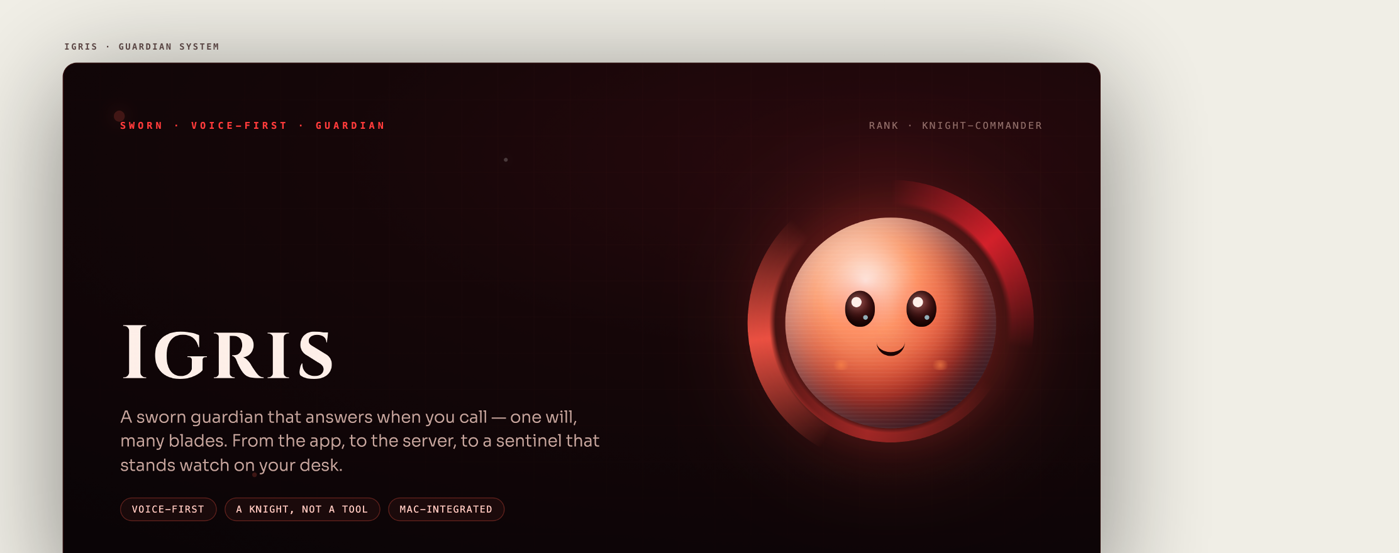
<p><img src="/assets/images/igris/01-hero.png" alt="Igris brand - sworn guardian, voice-first" /></p>

<p><strong>TL;DR:</strong> Igris is my long-cycle personal agent project. The OAU prototype is now a modern voice-native stack (Go brain, Apple clients) plus a <strong>software and 3D hardware</strong> plan: one will, many blades (phone, Mac, desk sentinels, field units).</p>

<hr />

<h2 id="what-the-2014-version-got-right">What the 2014 version got right</h2>

<p>Even with limited resources, the old design instincts were solid:</p>

<ol>
  <li><strong>Voice first</strong> - if you have to type everything, it’s an app, not an assistant.</li>
  <li><strong>Actions, not answers</strong> - open, close, power state; agency over encyclopedia mode.</li>
  <li><strong>Presence UI</strong> - the orb / reactor aesthetic wasn’t decoration; it was state machine visualization before I had the vocabulary for that.</li>
  <li><strong>Local life integration</strong> - the PC was the body. The assistant lived where work happened.</li>
</ol>

<p>What it lacked was everything the industry spent a decade building: reliable STT/TTS, long-context brains, tool protocols, mobile as a first-class body, and enough personal platform skill to ship a control plane instead of a demo script.</p>

<hr />

<h2 id="what-igris-is-now-software">What Igris is now (software)</h2>

<p>From the public tree (repo still uses some <code class="language-plaintext highlighter-rouge">jarvis</code> paths under the hood - the lineage is not subtle):</p>

<div class="language-plaintext highlighter-rouge"><div class="highlight"><pre class="highlight"><code>server/ Go: agent loop, memory, voice gateway - one binary
apple/ SwiftUI clients: iPhone, iPad, Mac menu bar
</code></pre></div></div>

<p><strong>Brain:</strong> Go server. Default path Claude; any OpenAI-compatible mind via config (including local models). 
<strong>Ears/mouth:</strong> Deepgram live STT + VAD; speech out native Apple by default, or server TTS when you want it. 
<strong>Body:</strong> Apple-only thin clients on one full-duplex WebSocket. No web client by design. 
<strong>Tools:</strong> reminders, tasks, web search, local Mac integrations (calendar, mail, messages - with <strong>confirm-before-send</strong> for anything that leaves the machine), MCP servers, background coding jobs.</p>

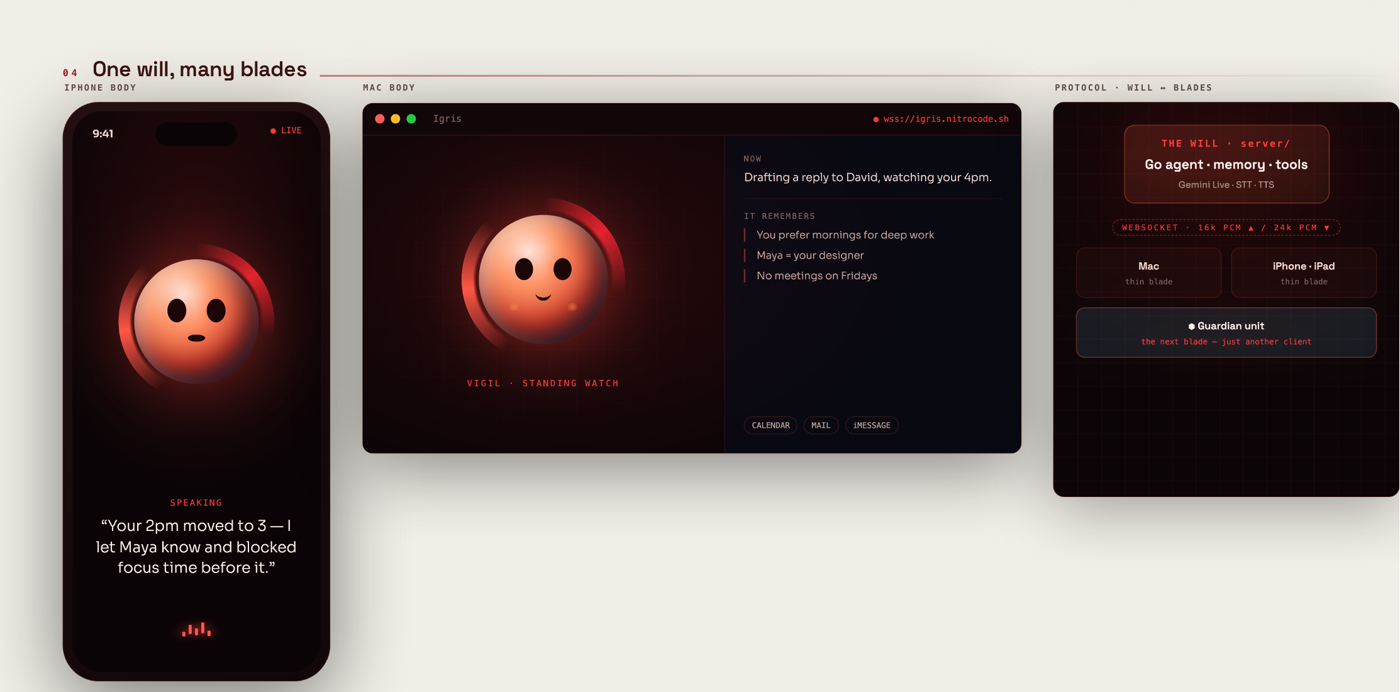
<p>Architecture in one line: <strong>one protocol, many bodies.</strong> The phone is not a separate product from the Mac menu bar; both are skins over the same agent loop - the same “one will, many blades” idea the hardware plan extends.</p>

<p><img src="/assets/images/igris/05-blades-ui.png" alt="iPhone, Mac, and protocol - one will, many blades" /></p>

<p>Run the brain (dev shape):</p>

<div class="language-bash highlighter-rouge"><div class="highlight"><pre class="highlight"><code><span class="nb">cd </span>server
<span class="nb">export </span><span class="nv">DEEPGRAM_API_KEY</span><span class="o">=</span>...
<span class="nb">export </span><span class="nv">ANTHROPIC_API_KEY</span><span class="o">=</span>sk-ant-...
go run ./cmd/jarvis
<span class="c"># health: curl localhost:8787/healthz</span>
</code></pre></div></div>

<p>Point the Apple app at <code class="language-plaintext highlighter-rouge">ws://…:8787/ws</code> with a bearer token. Prefer Tailscale or private network over “exposed to the internet with a hope and a JWT.”</p>

<p>Source: <a href="https://github.com/9trocode/Igris">github.com/9trocode/Igris</a></p>

<hr />

<h2 id="face-states-not-wallpaper">Face states (not wallpaper)</h2>

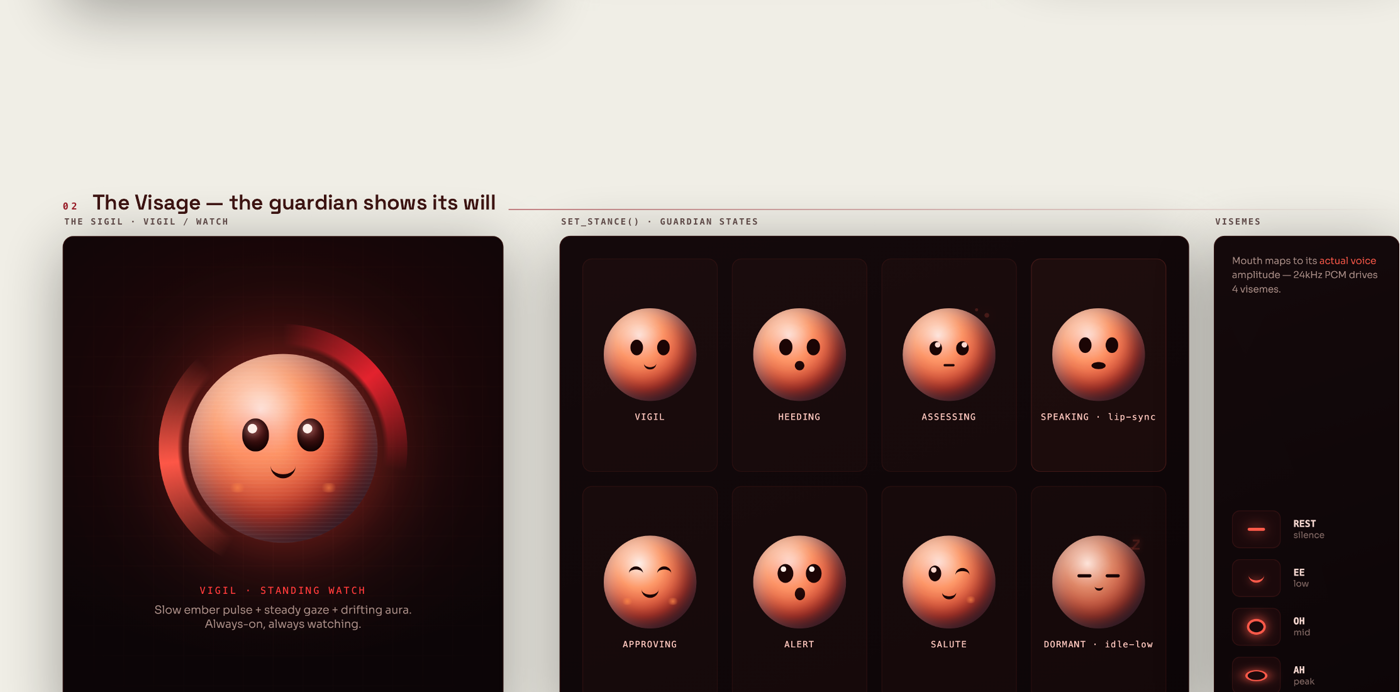
<p>The face is a status display: slow pulse at rest, then clear stances for listening, assessing, speaking (with lip shapes), alert, dormant. The 2014 orb was the same idea; this version is a state machine you can read on the glass.</p>

<p><img src="/assets/images/igris/03-visage-states.png" alt="Guardian states and visemes" /></p>

<hr />

<h2 id="3d-plan---guardian-forms-not-a-speaker-puck">3D plan - guardian forms, not a speaker puck</h2>

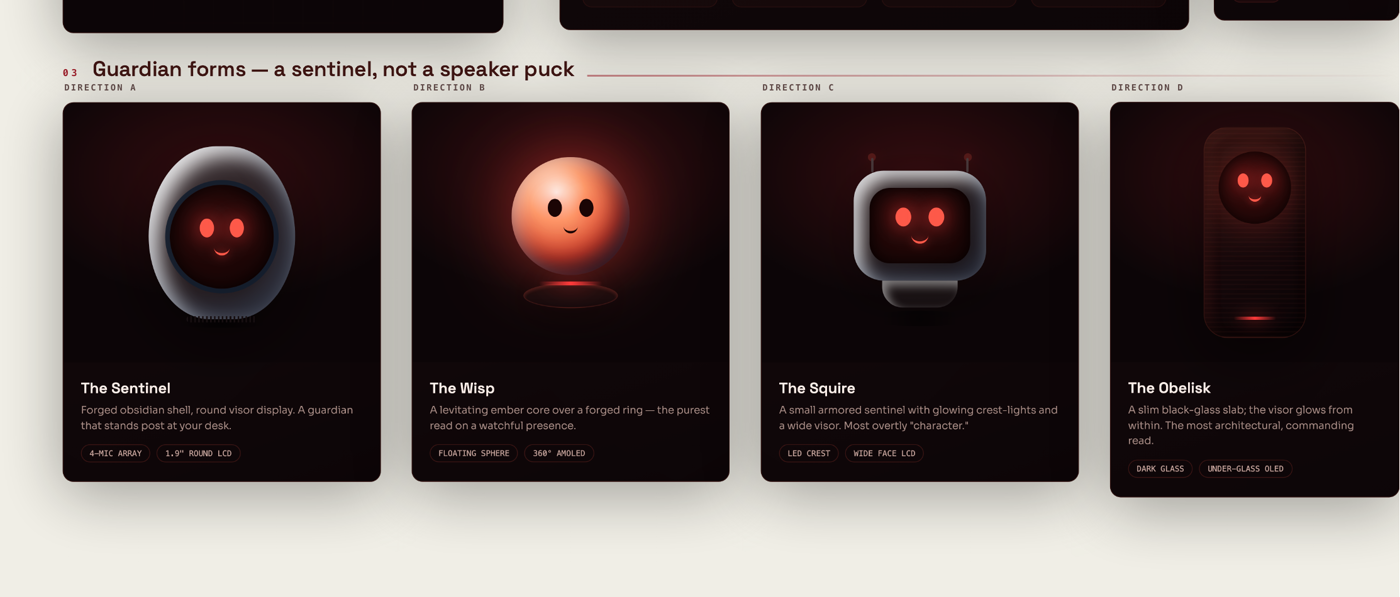
<p>Igris isn’t meant to live only as an icon on a phone. The design board locks <strong>four desk-scale directions</strong> - hardware with a face and a job:</p>

<table>
  <thead>
    <tr>
      <th>Form</th>
      <th>Idea</th>
    </tr>
  </thead>
  <tbody>
    <tr>
      <td><strong>The Sentinel</strong></td>
      <td>Forged shell, round visor, stands post on the desk</td>
    </tr>
    <tr>
      <td><strong>The Wisp</strong></td>
      <td>Levitating ember core on a ring - pure watchful presence</td>
    </tr>
    <tr>
      <td><strong>The Squire</strong></td>
      <td>Small armored unit, wide visor, overtly “character”</td>
    </tr>
    <tr>
      <td><strong>The Obelisk</strong></td>
      <td>Slim black-glass slab; architectural, under-glass OLED</td>
    </tr>
  </tbody>
</table>

<p><img src="/assets/images/igris/04-guardian-forms-3d.png" alt="Guardian forms - Sentinel, Wisp, Squire, Obelisk" /></p>

<p>Same idea as the software clients: <strong>one brain, many thin clients</strong>. The desk unit is another WebSocket body, not a separate product with its own half-broken firmware personality.</p>

<hr />

<h2 id="field-units---seven-blades-one-will">Field units - seven blades, one will</h2>

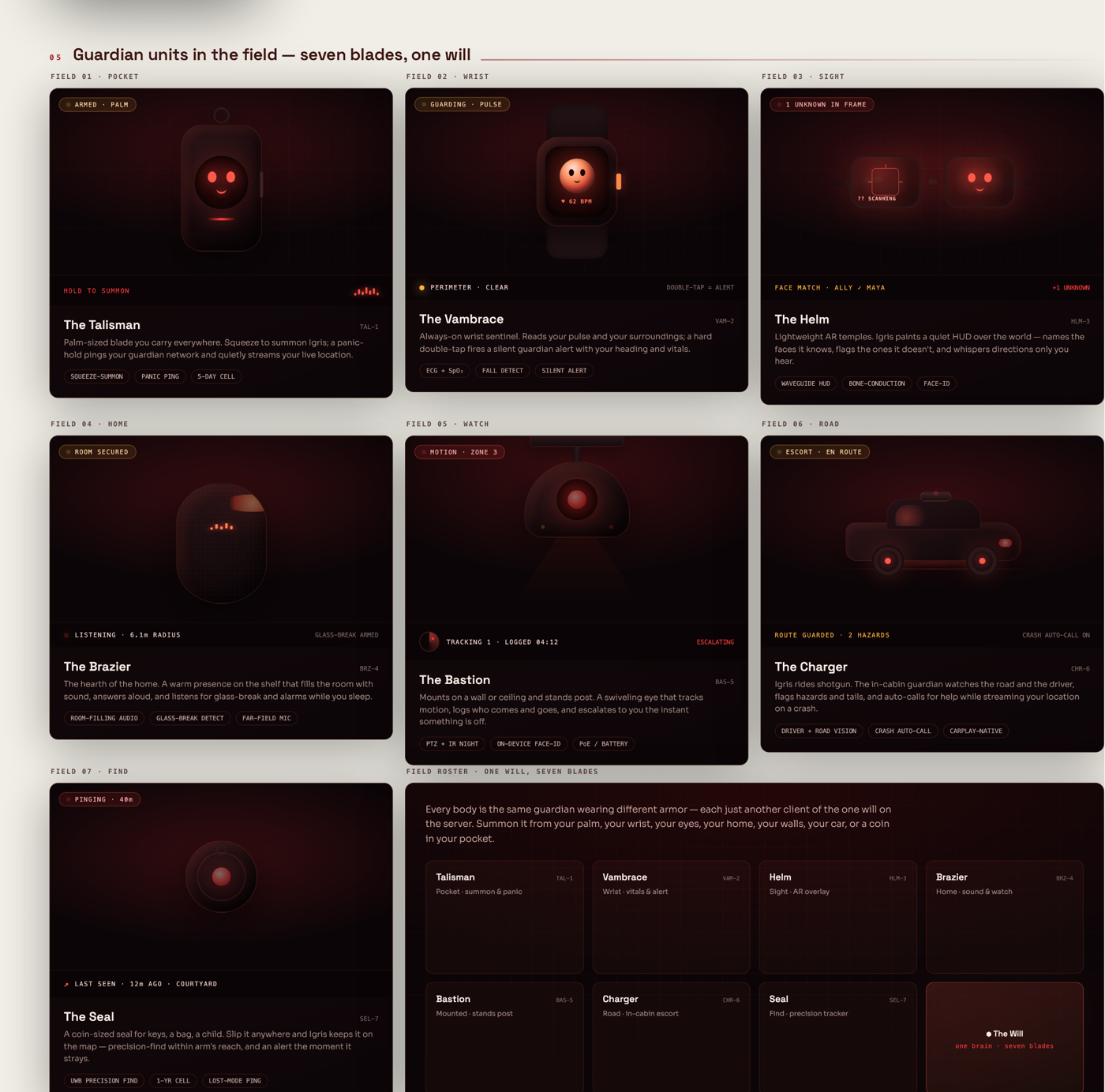
<p>Beyond the desk, the ecosystem plan spreads the same guardian into the world: pocket, wrist, sight, home, wall watch, road, find.</p>

<p><img src="/assets/images/igris/06-field-units.png" alt="Guardian units in the field - Talisman, Vambrace, Helm, Brazier, Bastion, Charger, Seal" /></p>

<ul>
  <li><strong>Talisman</strong> - palm summon, panic ping, location</li>
  <li><strong>Vambrace</strong> - wrist vitals + silent guardian alert</li>
  <li><strong>Helm</strong> - AR overlay / face match (quietly, only when you ask)</li>
  <li><strong>Brazier</strong> - home shelf presence, glass-break / far-field mic</li>
  <li><strong>Bastion</strong> - wall/ceiling eye that tracks motion</li>
  <li><strong>Charger</strong> - in-cabin escort on the road</li>
  <li><strong>Seal</strong> - coin-sized find / precision ping</li>
</ul>

<p>Every device is <strong>another client of the same server</strong>. Phone, wrist, desk, car: same agent, different body.</p>

<hr />

<h2 id="whats-next">What’s next</h2>

<p>I’m building this in public as far as the repo allows. Near-term focus for me:</p>

<ol>
  <li><strong>Reliability of the voice loop</strong> - barge-in, latency, silence, failure modes when STT flakes</li>
  <li><strong>Safer action surface</strong> - more confirmations, clearer audit of what the agent did</li>
  <li><strong>Bodies</strong> - Mac + iOS parity first; desk <strong>Sentinel / Wisp</strong> hardware when the protocol stays clean</li>
  <li><strong>Local-first options</strong> - brains and voices that don’t require every token to leave home</li>
  <li><strong>Field blades</strong> - pocket and home units after the software will is solid</li>
</ol>

<p>If the 2014 version was a spark on a student PC, this is the rebuild with a real stack and a real hardware plan for a desk unit that stands watch.</p>

<hr />

<h2 id="summary">Summary</h2>

<p>I built a voice desktop agent at OAU before the ecosystem could carry it. Igris is me finishing that work: voice-only, action-capable, software clients now, <strong>desk forms and field units</strong> on the roadmap.</p>

<p>Repo: <a href="https://github.com/9trocode/Igris">9trocode/Igris</a></p>]]></content><author><name>Alex Idowu</name><email>alexidowu25@gmail.com</email></author><category term="Igris" /><category term="Agents" /><category term="Voice" /><category term="Open Source" /><category term="Personal" /><category term="Go" /><summary type="html"><![CDATA[In 2014 at OAU I built a voice agent the stack could not carry. Sci-fi UI. A hey Jarvis wake word. Apps that opened when I spoke. Igris is me finishing that dream with a Go brain, Apple clients, and a 3D guardian plan.]]></summary><media:thumbnail xmlns:media="http://search.yahoo.com/mrss/" url="https://nitrocode.sh/assets/images/igris/hero-card.png" /><media:content medium="image" url="https://nitrocode.sh/assets/images/igris/hero-card.png" xmlns:media="http://search.yahoo.com/mrss/" /></entry><entry><title type="html">Namespaces Aren’t Isolation</title><link href="https://nitrocode.sh/blog/2026/08/11/namespaces-arent-isolation" rel="alternate" type="text/html" title="Namespaces Aren’t Isolation" /><published>2026-08-11T00:00:00+00:00</published><updated>2026-08-11T00:00:00+00:00</updated><id>https://nitrocode.sh/blog/2026/08/11/namespaces-arent-isolation</id><content type="html" xml:base="https://nitrocode.sh/blog/2026/08/11/namespaces-arent-isolation"><![CDATA[<p>“We give every customer their own namespace” is the most common multi-tenant Kubernetes story I hear.</p>

<p>It’s also usually incomplete.</p>

<p>Namespaces are a <strong>scoping convenience</strong>, not a security boundary. If your platform’s isolation story stops at <code class="language-plaintext highlighter-rouge">metadata.namespace</code>, you’re running shared fate with extra YAML.</p>

<p>I learned this the expensive way while designing multi-tenant hosting for people who didn’t have (or want) a full cloud account. That path shipped as <strong>Nova</strong> on PipeOps. This post is the isolation design, not a product brochure. Product notes: <a href="/blog/2024/11/01/nova-multitenancy">How Nova Isolates Tenants on Shared Kubernetes</a>.</p>

<p><strong>TL;DR:</strong> Soft multi-tenancy needs controls that actually enforce isolation, not a namespace label. In our stack that means API identity (no raw apiserver), NetworkPolicy, resource quotas, and a stronger runtime for tenant code (<strong>gVisor / <code class="language-plaintext highlighter-rouge">runsc</code></strong>, not stock runc). Capsule, NetworkPolicies, quotas, an impersonating proxy, and gVisor work together. Namespaces alone are not enough.</p>

<hr />

<h2 id="the-failed-first-design-keep-this-story">The failed first design (keep this story)</h2>

<p>Our first multi-tenant attempt was naive on purpose: one beefy node pool, many users, “split the bill.”</p>

<p>What broke in two weeks:</p>

<ul>
  <li><strong>No network isolation</strong> - pods could talk sideways</li>
  <li><strong>No meaningful quotas</strong> - one memory leak was everyone’s outage</li>
  <li><strong>Shared trust in the API</strong> - if you can reach the apiserver as a powerful subject, the namespace label is cosplay</li>
  <li><strong>Blast radius = the cluster</strong> - noisy neighbor wasn’t a metaphor</li>
</ul>

<p>We killed it. Soft multi-tenancy without enforcement is just <strong>colocation</strong>.</p>

<hr />

<h2 id="what-tenant-has-to-mean">What “tenant” has to mean</h2>

<p>For application platforms (not hyperscaler-grade hostile multitenancy), a tenant is roughly:</p>

<blockquote>
  <p>A principal that can deploy and operate workloads <strong>without reading, mutating, or starving</strong> other principals’ workloads - and without administering the host cluster.</p>
</blockquote>

<p>That implies controls for:</p>

<table>
  <thead>
    <tr>
      <th>Layer</th>
      <th>Failure if missing</th>
    </tr>
  </thead>
  <tbody>
    <tr>
      <td><strong>API identity</strong></td>
      <td>Cross-namespace get/list/watch, privilege escalation via bindings</td>
    </tr>
    <tr>
      <td><strong>Network</strong></td>
      <td>Lateral movement, data exfil to sibling tenants</td>
    </tr>
    <tr>
      <td><strong>Compute/storage</strong></td>
      <td>Noisy neighbor, disk fill, fork bombs</td>
    </tr>
    <tr>
      <td><strong>Node/kernel</strong></td>
      <td>Escape to host (default runc shares the host kernel aggressively)</td>
    </tr>
  </tbody>
</table>

<p>If you only sell “namespace,” you’ve only bought the first bullet’s <em>directory structure</em>.</p>

<p>Hard multi-tenancy (dedicated clusters/nodes, microVMs, bare metal) is a different product. Soft multi-tenancy is valid - <strong>if</strong> you raise the runtime bar and enforce the rest. We don’t stop at “shared kernel, shrug”; tenant workloads sit on <strong>gVisor</strong> so userland is isolated from the host more tightly than plain <code class="language-plaintext highlighter-rouge">runc</code>.</p>

<hr />

<h2 id="the-pattern-that-worked-for-us">The pattern that worked for us</h2>

<p>We needed virtual clusters <strong>without</strong> standing up a full control plane per customer (vCluster-class cost/ops). The stack:</p>

<ol>
  <li><strong>Namespace (or Tenant CR → namespaces) per customer</strong></li>
  <li><strong>Capsule</strong> as the multi-tenant operator (tenant boundaries, policy hooks)</li>
  <li><strong>ResourceQuota / LimitRange</strong> (and pod count caps)</li>
  <li><strong>NetworkPolicy</strong> default-deny + explicit allows</li>
  <li><strong>Capsule Proxy (or equivalent)</strong> so tenants never hold a kubeconfig that can see the real cluster API as cluster-admin cosplay</li>
  <li><strong>RBAC</strong> scoped to the tenant’s namespaces only</li>
  <li><strong>gVisor (<code class="language-plaintext highlighter-rouge">runsc</code>)</strong> as the container runtime for tenant workloads - application-kernel isolation between the pod and the host</li>
</ol>

<p>Flow in practice:</p>

<div class="language-plaintext highlighter-rouge"><div class="highlight"><pre class="highlight"><code>Tenant tooling / kubectl / CI
 │
 ▼
 Impersonating API proxy ──enforces tenant scope──► Kubernetes API
 │
 ├── RBAC: only their namespaces
 ├── Admission / operator: quotas, policies
 ├── CNI NetworkPolicies: no east-west between tenants
 └── RuntimeClass → gVisor (runsc) for tenant pods
</code></pre></div></div>

<p>To the user it <em>feels</em> like “my cluster.” 
To the platform it’s “your namespace(s) + API mediation + network/quota teeth + a sandboxed runtime.”</p>

<h3 id="why-a-proxy-this-is-the-non-negotiable">Why a proxy (this is the non-negotiable)</h3>

<p>The critical product decision: <strong>tenants never talk to the real apiserver with a wide-open credential.</strong></p>

<p>They talk to a proxy that:</p>

<ul>
  <li>Authenticates the tenant</li>
  <li>Impersonates a constrained identity</li>
  <li>Filters verbs/resources to their scope</li>
  <li>Rejects cluster-scoped power tools (<code class="language-plaintext highlighter-rouge">nodes</code>, other tenants’ namespaces, wild cluster role binds)</li>
</ul>

<p>If you hand out a normal kubeconfig against the shared apiserver and “trust RBAC,” one mis-bound RoleBinding or aggregated ClusterRole later, isolation is a blog post, not a property.</p>

<h3 id="why-networkpolicy-is-not-optional">Why NetworkPolicy is not optional</h3>

<p>Without default-deny:</p>

<ul>
  <li>Service discovery becomes a reconnaissance API</li>
  <li>One compromised app is a pivot into the estate</li>
  <li>“We use private clusters” doesn’t help <em>inside</em> the cluster</li>
</ul>

<p>Baseline I want on every soft multi-tenant pool:</p>

<ul>
  <li>Deny all ingress/egress by default in tenant namespaces</li>
  <li>Allow DNS to the cluster DNS service</li>
  <li>Allow egress only to what the product requires (registries, object storage, public web - <strong>deliberately</strong>)</li>
  <li>Allow ingress only from the platform ingress / mesh identity you own</li>
</ul>

<p>Policy drift kills you. Treat policies as <strong>part of tenant provisioning</strong>, not a ticket after an incident.</p>

<h3 id="why-quotas-are-a-security-control">Why quotas are a security control</h3>

<p>People file quotas under “FinOps.” They’re also <strong>availability security</strong>.</p>

<p>Without them:</p>

<ul>
  <li>One tenant schedules the node into death</li>
  <li>EmptyDir fills the disk</li>
  <li>CronJobs stampede the apiserver</li>
</ul>

<p>Every tenant needs at least:</p>

<ul>
  <li>CPU / memory requests+limits (LimitRange defaults)</li>
  <li>Namespace ResourceQuota</li>
  <li>Object count caps (pods, services, PVCs)</li>
  <li>Optional PriorityClass isolation so platform agents aren’t starved</li>
</ul>

<p>Exceeding quota should fail <strong>their</strong> deploys - not page your whole fleet.</p>

<h3 id="why-gvisor-not-just-docker">Why gVisor (not “just Docker”)</h3>

<p>API and network policy stop a lot of multi-tenant pain. They do <strong>not</strong> fix “this untrusted binary is talking to the host kernel through runc.”</p>

<p>For multi-tenant pools we run tenant workloads on <strong><a href="https://gvisor.dev/">gVisor</a></strong> (<code class="language-plaintext highlighter-rouge">runsc</code>): a user-space kernel that intercepts syscalls so guest code doesn’t get the full host kernel surface by default. Same Kubernetes UX (<code class="language-plaintext highlighter-rouge">RuntimeClass</code>), stronger isolation story than stock containers.</p>

<p>What it buys:</p>

<ul>
  <li>Smaller host-kernel attack surface for tenant pods</li>
  <li>A middle ground between “hope runc is fine” and “every tenant gets a VM”</li>
</ul>

<p>What it doesn’t buy:</p>

<ul>
  <li>Perfect multi-tenancy (nothing on a shared node is perfect)</li>
  <li>Free compatibility - some workloads hate gVisor’s syscall coverage; test your images</li>
  <li>An excuse to skip NetworkPolicy, quotas, or the API proxy</li>
</ul>

<p><strong>Pitfall:</strong> RuntimeClass on the YAML but nodes still defaulting to <code class="language-plaintext highlighter-rouge">runc</code>. If it isn’t enforced (admission / RuntimeClass default / restricted RuntimeClass), you have a blog post, not a control.</p>

<hr />

<h2 id="capsule-vs-the-alternatives-tradeoffs-not-religion">Capsule vs the alternatives (tradeoffs, not religion)</h2>

<p>We evaluated patterns in the usual set:</p>

<table>
  <thead>
    <tr>
      <th>Approach</th>
      <th>Pros</th>
      <th>Cons</th>
    </tr>
  </thead>
  <tbody>
    <tr>
      <td><strong>Namespaces + RBAC only</strong></td>
      <td>Simple</td>
      <td>Isolation theater</td>
    </tr>
    <tr>
      <td><strong>Hierarchical namespaces</strong></td>
      <td>Org-shaped trees</td>
      <td>Still soft; ops complexity</td>
    </tr>
    <tr>
      <td><strong>vCluster / virtual control planes</strong></td>
      <td>Stronger API isolation feel</td>
      <td>More moving parts, cost per tenant</td>
    </tr>
    <tr>
      <td><strong>Capsule-style tenant operator + gVisor</strong></td>
      <td>Soft multi-tenancy with policy hooks + sandboxed runtime</td>
      <td>Some syscall compatibility cost; still not a dedicated VM</td>
    </tr>
    <tr>
      <td><strong>Dedicated cluster per tenant</strong></td>
      <td>Clean blast radius</td>
      <td>Economics kill low-ARPU products</td>
    </tr>
  </tbody>
</table>

<p>We chose Capsule-class soft multi-tenancy <strong>plus gVisor</strong> because:</p>

<ul>
  <li>No second control plane per customer</li>
  <li>Works with normal Kubernetes tooling <em>through the proxy</em></li>
  <li>Policy and quota can be templated at tenant create</li>
  <li>Runtime isolation for tenant code without full microVM tax everywhere</li>
</ul>

<p>We still don’t market this as bare metal. If compliance needs dedicated hardware, provision <strong>their</strong> cloud account instead (Terraform runners - see <a href="/blog/2024/10/31/runner-terraform-provisioning">The Runner</a>). MicroVMs (Firecracker et al.) remain the next step when gVisor isn’t enough.</p>

<p>Different products, different isolation SLOs.</p>

<hr />

<h2 id="provisioning-checklist-steal-this">Provisioning checklist (steal this)</h2>

<p>When a tenant is created:</p>

<ol>
  <li>Create tenant object / namespace(s) with immutable labels (<code class="language-plaintext highlighter-rouge">tenant=…</code>)</li>
  <li>Apply <strong>ResourceQuota</strong> + <strong>LimitRange</strong></li>
  <li>Apply <strong>default-deny NetworkPolicy</strong> + DNS/egress allowlist</li>
  <li>Bind <strong>Role/RoleBinding</strong> only inside tenant namespaces</li>
  <li>Set <strong>RuntimeClass → gVisor</strong> for tenant workloads (and enforce it)</li>
  <li>Issue credentials <strong>only for the proxy</strong> (short-lived if you can)</li>
  <li>Run a smoke test:
    <ul>
      <li>can deploy to own namespace</li>
      <li>cannot list other namespaces</li>
      <li>cannot reach another tenant’s Service ClusterIP</li>
      <li>cannot create ClusterRoleBinding</li>
      <li>pods actually land on <code class="language-plaintext highlighter-rouge">runsc</code> (not silent runc fallback)</li>
    </ul>
  </li>
  <li>Emit audit events for admin-ish verbs</li>
</ol>

<p>Automate the smoke test. Manual “looks good” doesn’t scale.</p>

<hr />

<h2 id="pitfalls-ive-seen-including-ours">Pitfalls I’ve seen (including ours)</h2>

<ol>
  <li><strong>Ingress as a free lateral path</strong> - misconfigured shared ingress controllers become universal peers.</li>
  <li><strong>Cluster-wide CRDs without tenancy</strong> - one CRD install is a shared brain; gate who can create CRs.</li>
  <li><strong>Node filesystem assumptions</strong> - hostPath is a footgun; ban it for tenants.</li>
  <li><strong>Privileged pods / CAP_SYS_ADMIN</strong> - if your PSS/PSA isn’t enforced, NetworkPolicy won’t save you.</li>
  <li><strong>“Admin kubeconfig for support”</strong> - support tooling becomes the real attack surface; impersonate with break-glass and audit.</li>
  <li><strong>Log and metric multi-tenancy</strong> - observability backends that don’t filter by tenant leak data as surely as etcd.</li>
  <li><strong>RuntimeClass theater</strong> - gVisor on paper, tenants still scheduled on runc.</li>
</ol>

<hr />

<h2 id="summary">Summary</h2>

<p>We tried shared hosts without teeth. It failed. Soft multi-tenancy only became real when tenants stopped holding the real apiserver, networks defaulted to deny, quotas made noisy neighbors a local outage, and workloads ran under <strong>gVisor</strong> instead of plain runc cosplay.</p>

<p>A namespace is a folder label. Isolation is the proxy, the policies, the quotas, and the runtime. If your diagrams only show green boxes labeled “Namespace,” you’re selling colocation.</p>

<p>Write the threat model on one page, name the runtime boundary (gVisor / microVM / dedicated node), and don’t ship tenant create until the checklist above is automated.</p>

<h2 id="related-writing">Related writing</h2>

<ul>
  <li><a href="/blog/2024/11/01/nova-multitenancy">How Nova Isolates Tenants</a> - product path for cheap shared hosting</li>
  <li><a href="/blog/2026/08/11/how-to-safely-give-ai-agents-a-terminal">How to Safely Give AI Agents a Terminal</a> - same isolation mindset for untrusted agents</li>
  <li><a href="/blog/2024/10/31/runner-terraform-provisioning">Terraform multi-cloud Runner</a> - provisioning clusters before tenancy matters</li>
  <li><a href="/work/">Work catalogue</a></li>
</ul>]]></content><author><name>Alex Idowu</name><email>alexidowu25@gmail.com</email></author><category term="Kubernetes" /><category term="Multi-tenancy" /><category term="Security" /><category term="Platform Engineering" /><category term="Capsule" /><category term="gVisor" /><category term="Multi-tenant Kubernetes" /><summary type="html"><![CDATA[Multi-tenant Kubernetes isolation beyond namespaces: Capsule, default-deny NetworkPolicy, quotas, an API proxy, and gVisor. What we shipped after the first shared-cluster design failed.]]></summary><media:thumbnail xmlns:media="http://search.yahoo.com/mrss/" url="https://nitrocode.sh/assets/images/nitrocode-og-v2.png" /><media:content medium="image" url="https://nitrocode.sh/assets/images/nitrocode-og-v2.png" xmlns:media="http://search.yahoo.com/mrss/" /></entry><entry><title type="html">Rexec: The Terminal Control Room I Built to Test a CLI</title><link href="https://nitrocode.sh/blog/2026/02/27/rexec-terminal-control-room" rel="alternate" type="text/html" title="Rexec: The Terminal Control Room I Built to Test a CLI" /><published>2026-02-27T00:00:00+00:00</published><updated>2026-02-27T00:00:00+00:00</updated><id>https://nitrocode.sh/blog/2026/02/27/rexec-terminal-control-room</id><content type="html" xml:base="https://nitrocode.sh/blog/2026/02/27/rexec-terminal-control-room"><![CDATA[<p>I built <strong>rexec</strong> because I was tired of <em>pretending</em> my CLI worked everywhere.</p>

<p>I needed real-world testing across different machines and architectures - not just “works on my laptop” and not just CI logs. The quickest thing that could give me that was: <strong>a disposable terminal I can spin up anywhere, run the binary, and throw away</strong>.</p>

<p>That small tool turned into something bigger: a terminal control room for cloud sandboxes <em>and</em> your own machines.</p>

<p><strong>TL;DR:</strong> Rexec is a Terminal-as-a-Service platform: create network-isolated cloud terminals (Docker-backed), connect your own machines with an outbound agent, share sessions, record sessions, and integrate via CLI/SDKs or an embed widget.</p>

<p><strong>Positioning:</strong> Rexec turns terminals into infrastructure primitives.</p>

<p>Terminals become API-managed sandboxes you can create, connect to (WebSocket), run commands in, share, record, lock down, and delete - with guardrails.</p>

<hr />

<h2 id="the-origin-story-and-the-accidental-product">The Origin Story (And the Accidental Product)</h2>

<p>Rexec started off as a small tool I needed to test our CLI and agent binary on different machine types with real-world usage.</p>

<p>Then the scope creep hit:</p>

<ol>
  <li><strong>CLI testing across machines</strong>: “Does this binary behave the same on Ubuntu vs Alpine? AMD64 vs ARM64? Fresh box vs crusty box?”</li>
  <li><strong>Cloud shell</strong>: once you can spin terminals up quickly, it’s basically a cloud shell. So we built a proper terminal UX around it.</li>
  <li><strong>Widget mode</strong>: then we added an embeddable widget, because the terminal shouldn’t live only inside the dashboard.</li>
  <li><strong>Students + low-spec laptops</strong>: a hosted terminal with a curated toolchain is a cheat code for learning when your laptop is underpowered (or you don’t have one).</li>
  <li><strong>Agent sandboxes</strong>: once I installed <code class="language-plaintext highlighter-rouge">opencode</code> in a terminal and started running AI-generated code in there, it clicked - this is a safer default for agents and automation.</li>
  <li><strong>Shared expensive machines</strong>: teams can connect a single beefy box (yes, including a GPU machine) and manage access without turning SSH keys into a company-wide group chat.</li>
</ol>

<p>Rexec is now a multipurpose tool. We use it for all of the above. And it’s open source.</p>

<hr />

<h2 id="what-rexec-actually-is">What Rexec Actually Is</h2>

<p>Rexec has two primitives:</p>

<ol>
  <li><strong>Cloud terminals</strong>: disposable Linux environments running as isolated containers.</li>
  <li><strong>BYOS agents</strong>: connect your own server/laptop/Raspberry Pi into the same dashboard via an outbound WebSocket tunnel.</li>
</ol>

<p>Everything else (CLI, SDKs, widget, collaboration, recording) is built around making those two primitives usable in real workflows.</p>

<p>Canonical links:</p>
<ul>
  <li>Docs: https://rexec.sh/docs</li>
  <li>Resources/tutorials: https://rexec.sh/resources</li>
  <li>Source: https://github.com/PipeOpsHQ/rexec</li>
</ul>

<hr />

<h2 id="how-we-built-it-high-level-architecture">How We Built It (High-Level Architecture)</h2>

<p>Rexec is intentionally boring infrastructure:</p>

<ul>
  <li><strong>Compute</strong>: Docker/Podman containers with hard CPU/memory/PID limits (and optional disk quotas when the host supports it).</li>
  <li><strong>Isolation</strong>: terminals attach to an isolated bridge network with inter-container communication disabled (<code class="language-plaintext highlighter-rouge">rexec-isolated</code>) and hardened container settings (dropped capabilities + <code class="language-plaintext highlighter-rouge">no-new-privileges</code>).</li>
  <li><strong>Terminal UX</strong>: WebSocket streaming to xterm.js, with <code class="language-plaintext highlighter-rouge">tmux</code> inside the container for reconnect + scrollback.</li>
  <li><strong>BYOS</strong>: agents connect outbound over WebSockets (no inbound SSH ports).</li>
  <li><strong>State</strong>: PostgreSQL for users/sessions/audit logs; optional S3 for session recordings.</li>
</ul>

<p>From the OSS README, the architecture looks like this:</p>

<div class="language-plaintext highlighter-rouge"><div class="highlight"><pre class="highlight"><code>[Browser UI] ←(WebSocket)→ [Rexec API] ←→ [PostgreSQL]
 │
 ├── [Container Manager] ──→ [Docker Engine]
 │
 └── [Agent Handler] ←(WebSocket)→ [Remote Agents]
</code></pre></div></div>

<p>Implementation stack (also from the repo):</p>

<ul>
  <li><strong>Frontend</strong>: Svelte + xterm.js + Tailwind CSS</li>
  <li><strong>Backend</strong>: Go (Gin) + Gorilla WebSocket</li>
  <li><strong>Runtime</strong>: Docker Engine</li>
  <li><strong>DB</strong>: PostgreSQL</li>
</ul>

<p>The design goal is simple: a terminal that feels native, but is disposable by default.</p>

<p>One implementation detail that matters: cloud terminals are kept alive (the container runs indefinitely), and interactive sessions attach via <code class="language-plaintext highlighter-rouge">exec</code> into a <code class="language-plaintext highlighter-rouge">tmux</code> session. That’s what makes disconnect/reconnect cheap.</p>

<hr />

<h2 id="what-it-can-do-without-the-marketing">What It Can Do (Without the Marketing)</h2>

<h3 id="1-disposable-network-isolated-linux-terminals">1) Disposable, network-isolated Linux terminals</h3>

<p>Spin up a new terminal, test something risky, then delete it. You can choose from common images (Ubuntu/Debian/Alpine/Fedora/Arch/Kali, etc) depending on the workflow.</p>

<p>This is the feature that makes everything else possible: once environments are cheap, you stop doing dangerous things on your laptop.</p>

<h3 id="2-a-real-terminal-ux-not-a-toy-web-console">2) A real terminal UX (not a toy web console)</h3>

<p>Rexec streams a proper terminal session (xterm.js) over WebSockets, with session persistence and collaboration.</p>

<p>The “instant access” trick is that you can start typing while the environment finishes provisioning in the background - no staring at progress bars.</p>

<h3 id="3-bring-your-own-server-access-byos-agent">3) Bring-your-own-server access (BYOS agent)</h3>

<p>If you already have machines you care about (prod boxes, staging, a GPU workstation, a lab server), you can connect them to Rexec via an outbound agent. The machine shows up like a terminal you can click into.</p>

<p>Key point: you’re not opening inbound SSH or building VPN spaghetti.</p>

<h3 id="4-collaboration--session-recording">4) Collaboration + session recording</h3>

<p>Two features that matter when you’re doing real ops work:</p>

<ul>
  <li><strong>Share a session</strong> (view/control) for pair debugging or teaching.</li>
  <li><strong>Record a session</strong> and replay it for documentation, auditing, or incident reviews.</li>
</ul>

<h3 id="5-cli--tui-power-user-mode">5) CLI + TUI (power-user mode)</h3>

<p>The <code class="language-plaintext highlighter-rouge">rexec</code> CLI lets you create/list/connect to terminals, manage snippets/macros, and register agents.</p>

<p>Some quick examples:</p>

<div class="language-bash highlighter-rouge"><div class="highlight"><pre class="highlight"><code>rexec login
rexec <span class="nb">ls
</span>rexec create <span class="nt">--name</span> mydev <span class="nt">--image</span> ubuntu:24.04
rexec connect &lt;terminal-id&gt;
rexec <span class="nt">-i</span>
</code></pre></div></div>

<p>It also supports shell completion and SSH integration patterns (ProxyCommand) if you’re the type of person that lives in <code class="language-plaintext highlighter-rouge">~/.ssh/config</code>.</p>

<h3 id="6-sdks--api-for-automation-and-agents">6) SDKs + API for automation and agents</h3>

<p>Rexec exposes a REST API (and WebSockets for terminals). On top of that, there are official SDKs in multiple languages (Go, JS/TS, Python, Rust, Ruby, Java, .NET, PHP).</p>

<p>Example (Python-style SDK usage):</p>

<div class="language-python highlighter-rouge"><div class="highlight"><pre class="highlight"><code><span class="kn">import</span> <span class="n">asyncio</span>
<span class="kn">from</span> <span class="n">rexec</span> <span class="kn">import</span> <span class="n">RexecClient</span>

<span class="k">async</span> <span class="k">def</span> <span class="nf">main</span><span class="p">():</span>
 <span class="k">async</span> <span class="k">with</span> <span class="nc">RexecClient</span><span class="p">(</span><span class="sh">"</span><span class="s">https://rexec.sh</span><span class="sh">"</span><span class="p">,</span> <span class="sh">"</span><span class="s">YOUR_API_TOKEN</span><span class="sh">"</span><span class="p">)</span> <span class="k">as</span> <span class="n">client</span><span class="p">:</span>
 <span class="n">container</span> <span class="o">=</span> <span class="k">await</span> <span class="n">client</span><span class="p">.</span><span class="n">containers</span><span class="p">.</span><span class="nf">create</span><span class="p">(</span><span class="n">image</span><span class="o">=</span><span class="sh">"</span><span class="s">ubuntu:24.04</span><span class="sh">"</span><span class="p">,</span> <span class="n">name</span><span class="o">=</span><span class="sh">"</span><span class="s">sdk-demo</span><span class="sh">"</span><span class="p">)</span>
 <span class="k">async</span> <span class="k">with</span> <span class="n">client</span><span class="p">.</span><span class="n">terminal</span><span class="p">.</span><span class="nf">connect</span><span class="p">(</span><span class="n">container</span><span class="p">.</span><span class="nb">id</span><span class="p">)</span> <span class="k">as</span> <span class="n">term</span><span class="p">:</span>
 <span class="k">await</span> <span class="n">term</span><span class="p">.</span><span class="nf">write</span><span class="p">(</span><span class="sa">b</span><span class="sh">"</span><span class="s">echo </span><span class="sh">'</span><span class="s">Hello from Rexec!</span><span class="sh">'</span><span class="se">\n</span><span class="sh">"</span><span class="p">)</span>
 <span class="n">out</span> <span class="o">=</span> <span class="k">await</span> <span class="n">term</span><span class="p">.</span><span class="nf">read</span><span class="p">()</span>
 <span class="nf">print</span><span class="p">(</span><span class="n">out</span><span class="p">.</span><span class="nf">decode</span><span class="p">())</span>

<span class="n">asyncio</span><span class="p">.</span><span class="nf">run</span><span class="p">(</span><span class="nf">main</span><span class="p">())</span>
</code></pre></div></div>

<h3 id="7-embeddable-terminal-widget">7) Embeddable terminal widget</h3>

<p>This is the “cloud shell inside your docs” feature.</p>

<p>You add a script tag, create a div, then embed a session using either:</p>

<ul>
  <li>a <strong>share code</strong> (guest access), or</li>
  <li>an <strong>API token</strong> (authenticated)</li>
</ul>

<p>Minimal embed example:</p>

<div class="language-html highlighter-rouge"><div class="highlight"><pre class="highlight"><code><span class="nt">&lt;script </span><span class="na">src=</span><span class="s">"https://rexec.sh/embed/rexec.min.js"</span><span class="nt">&gt;&lt;/script&gt;</span>

<span class="nt">&lt;div</span> <span class="na">id=</span><span class="s">"terminal"</span> <span class="na">style=</span><span class="s">"width: 100%; height: 400px;"</span><span class="nt">&gt;&lt;/div&gt;</span>

<span class="nt">&lt;script&gt;</span>
 <span class="kd">const</span> <span class="nx">term</span> <span class="o">=</span> <span class="nx">Rexec</span><span class="p">.</span><span class="nf">embed</span><span class="p">(</span><span class="dl">'</span><span class="s1">#terminal</span><span class="dl">'</span><span class="p">,</span> <span class="p">{</span>
 <span class="na">shareCode</span><span class="p">:</span> <span class="dl">'</span><span class="s1">YOUR_SHARE_CODE</span><span class="dl">'</span>
 <span class="p">});</span>
<span class="nt">&lt;/script&gt;</span>
</code></pre></div></div>

<p>Token mode (create a new terminal from your site) looks like this:</p>

<div class="language-html highlighter-rouge"><div class="highlight"><pre class="highlight"><code><span class="nt">&lt;script&gt;</span>
 <span class="kd">const</span> <span class="nx">term</span> <span class="o">=</span> <span class="nx">Rexec</span><span class="p">.</span><span class="nf">embed</span><span class="p">(</span><span class="dl">'</span><span class="s1">#terminal</span><span class="dl">'</span><span class="p">,</span> <span class="p">{</span>
 <span class="na">token</span><span class="p">:</span> <span class="dl">'</span><span class="s1">YOUR_API_TOKEN</span><span class="dl">'</span><span class="p">,</span>
 <span class="na">image</span><span class="p">:</span> <span class="dl">'</span><span class="s1">ubuntu</span><span class="dl">'</span><span class="p">,</span>
 <span class="na">role</span><span class="p">:</span> <span class="dl">'</span><span class="s1">python</span><span class="dl">'</span>
 <span class="p">});</span>
<span class="nt">&lt;/script&gt;</span>
</code></pre></div></div>

<p>This is why I think Rexec is useful for education and DevRel: you can turn “run this command” into “run it here”.</p>

<hr />

<h2 id="security-whats-actually-enforced">Security: What’s Actually Enforced</h2>

<p>Rexec runs arbitrary shell sessions. So security isn’t a paragraph - it’s the product.</p>

<p>Here’s what the open-source stack enforces for <strong>Linux terminals</strong> today (and what you can tune when self-hosting).</p>

<h3 id="container-boundaries">Container boundaries</h3>

<ul>
  <li><strong>No privileged containers</strong> (Linux terminals run with <code class="language-plaintext highlighter-rouge">Privileged: false</code>) plus <code class="language-plaintext highlighter-rouge">SecurityOpt: no-new-privileges:true</code></li>
  <li><strong>Capabilities</strong>: <code class="language-plaintext highlighter-rouge">CapDrop: ALL</code>, then add back a small allowlist (including <code class="language-plaintext highlighter-rouge">NET_BIND_SERVICE</code> for low ports, and <code class="language-plaintext highlighter-rouge">SYS_PTRACE</code> for debugging/TUI tools)</li>
  <li><strong>Default seccomp</strong> profile (not <code class="language-plaintext highlighter-rouge">unconfined</code>)</li>
  <li><strong>Host info masking</strong> via masked <code class="language-plaintext highlighter-rouge">/proc</code> + read-only <code class="language-plaintext highlighter-rouge">/proc/sys*</code> paths</li>
</ul>

<h3 id="network-isolation-model">Network isolation model</h3>

<ul>
  <li>Terminals attach to a dedicated bridge network: <code class="language-plaintext highlighter-rouge">rexec-isolated</code></li>
  <li>Inter-container communication is disabled (<code class="language-plaintext highlighter-rouge">com.docker.network.bridge.enable_icc=false</code>)</li>
</ul>

<p>This doesn’t mean “no internet”. It means “don’t let user sandboxes talk to each other by default.”</p>

<h3 id="resource--abuse-controls">Resource + abuse controls</h3>

<ul>
  <li><strong>Hard memory limit</strong> with swap disabled (<code class="language-plaintext highlighter-rouge">MemorySwap == Memory</code>)</li>
  <li><strong>CPU quota</strong> limiting (<code class="language-plaintext highlighter-rouge">CPUPeriod</code>/<code class="language-plaintext highlighter-rouge">CPUQuota</code>)</li>
  <li><strong>PIDs limit</strong> (fork-bomb brake)</li>
  <li><strong>Optional disk quotas</strong> when the host supports it (overlay2 quotas, typically XFS/ext4)</li>
  <li><strong>Rate limiting</strong> at multiple layers (nginx at the edge + application middleware)</li>
</ul>

<h3 id="auth--audit-trail">Auth + audit trail</h3>

<ul>
  <li>JWT auth + MFA support, plus hardened account options like <strong>single-session mode</strong> and <strong>IP allowlists</strong></li>
  <li>Sensitive stored values are protected (API tokens are stored <strong>hashed</strong>, and secrets like MFA/SSH material are <strong>encrypted at rest</strong>)</li>
  <li>Audit logs stored in Postgres (action, IP, user-agent, JSON details)</li>
  <li>Session recording (optional S3 backend) for replay/auditing</li>
</ul>

<h3 id="runtime-isolation-gvisor">Runtime isolation: gVisor</h3>

<p>Rexec uses <strong>gVisor</strong> for stronger sandbox isolation on cloud terminals. Set the OCI runtime to <code class="language-plaintext highlighter-rouge">runsc</code> so guest syscalls are handled in user space instead of riding plain <code class="language-plaintext highlighter-rouge">runc</code> on the host kernel:</p>

<div class="language-yaml highlighter-rouge"><div class="highlight"><pre class="highlight"><code><span class="c1"># example self-host env for the rexec service</span>
<span class="s">OCI_RUNTIME=runsc</span>
</code></pre></div></div>

<p>That matches the multi-tenant Kubernetes isolation story: untrusted workloads shouldn’t default to stock container runtimes. Kata (<code class="language-plaintext highlighter-rouge">OCI_RUNTIME=kata</code>) and <strong>Firecracker microVM terminals</strong> remain options when you need a harder boundary still.</p>

<h3 id="caveats-the-honest-part">Caveats (the honest part)</h3>

<ul>
  <li>The root filesystem is currently <strong>writable</strong> to support role/tool installation - pair that with gVisor, don’t skip the runtime.</li>
  <li><code class="language-plaintext highlighter-rouge">/tmp</code> is mounted <code class="language-plaintext highlighter-rouge">exec</code> in the default profile to support some terminal tooling. Tighten it if you don’t need that.</li>
</ul>

<hr />

<h2 id="differentiation-compared-to-the-usual-suspects">Differentiation: Compared to the Usual Suspects</h2>

<p>If you’re evaluating Rexec, you’re probably comparing it to one of these:</p>

<table>
  <thead>
    <tr>
      <th>Compared to</th>
      <th>The line in the sand</th>
    </tr>
  </thead>
  <tbody>
    <tr>
      <td>GitHub Codespaces / Gitpod</td>
      <td>Great repo-first IDE workspaces. Rexec is terminal-first: disposable sandboxes + BYOS agents + embed widget + SDKs.</td>
    </tr>
    <tr>
      <td>Cloud Shell</td>
      <td>Usually cloud-vendor specific and tied to their control plane. Rexec is neutral and self-hostable.</td>
    </tr>
    <tr>
      <td>wetty / ttyd / “web SSH”</td>
      <td>Mostly a UI on top of <em>one</em> machine. Rexec adds disposable sandboxes, guardrails, collaboration/recording, and an automation surface (CLI/SDK).</td>
    </tr>
    <tr>
      <td>SSH jumpboxes</td>
      <td>You can DIY, but then you’re building auth, auditing, sharing, recordings, and access workflows yourself. Rexec packages the “terminal control room” layer.</td>
    </tr>
  </tbody>
</table>

<p>If you want a full VS Code-in-the-browser experience, use Codespaces/Gitpod. If you want governed terminals as a primitive (sandboxes + BYOS + embed + API), that’s the lane Rexec is in.</p>

<hr />

<h2 id="performance--scaling-the-boring-parts">Performance &amp; Scaling (The Boring Parts)</h2>

<ul>
  <li><strong>Startup</strong> is “create container + start container”. For faster boots, you can prebuild <code class="language-plaintext highlighter-rouge">rexec-*</code> images (<code class="language-plaintext highlighter-rouge">./scripts/build-images.sh</code>) so basics (like SSH) are already there.</li>
  <li><strong>Reconnect</strong> is fast because the session is <code class="language-plaintext highlighter-rouge">tmux</code>-backed, and the terminal attaches via <code class="language-plaintext highlighter-rouge">exec</code>. Scrollback is configured to be large (tmux history is set to 50,000 lines).</li>
  <li><strong>Fairness</strong> is enforced with hard CPU/memory/PID limits, plus per-tier container/agent limits.</li>
  <li><strong>Abuse prevention</strong> exists at multiple layers (edge + app). If you run a public instance, this matters.</li>
  <li><strong>Stronger sandboxes:</strong> prefer <strong><code class="language-plaintext highlighter-rouge">OCI_RUNTIME=runsc</code> (gVisor)</strong> for agent/multi-tenant-style isolation; Kata remains available when you need that path.</li>
  <li>At “real usage” scale (dozens → hundreds of concurrent terminals), this becomes capacity planning: per-terminal caps, container-host sizing, and a load balancer that handles long-lived WebSockets properly.</li>
</ul>

<hr />

<h2 id="what-it-looks-like-in-practice">What It Looks Like in Practice</h2>

<h3 id="scenario-release-engineering-across-distros">Scenario: release engineering across distros</h3>

<p>You’re shipping a CLI. You want confidence it works on real environments, not just CI containers.</p>

<ol>
  <li>Create terminals across a few base images:</li>
</ol>

<div class="language-bash highlighter-rouge"><div class="highlight"><pre class="highlight"><code>rexec create <span class="nt">--name</span> cli-ubuntu <span class="nt">--image</span> ubuntu:24.04
rexec create <span class="nt">--name</span> cli-debian <span class="nt">--image</span> debian:12
rexec create <span class="nt">--name</span> cli-alpine <span class="nt">--image</span> alpine:3.21
</code></pre></div></div>

<ol>
  <li>Download the binary, run the same smoke test on all three.</li>
  <li>Share one session (view/control) when something breaks, and record it if you need a replayable artifact.</li>
</ol>

<h3 id="scenario-sre-debugging-without-ssh-key-chaos">Scenario: SRE debugging without SSH key chaos</h3>

<ol>
  <li>Install the agent on the box (outbound connection, no inbound SSH ports).</li>
  <li>Connect from the dashboard, share the session for pair debugging, and keep an audit trail with session recording.</li>
</ol>

<h3 id="scenario-education--devrel-that-actually-runs">Scenario: education + DevRel that actually runs</h3>

<p>Embed a terminal in docs/tutorials, hand out share codes, and let people run commands where they’re learning - without a “works on my machine” setup tax.</p>

<h3 id="scenario-agents-that-execute-in-a-sandbox">Scenario: agents that execute in a sandbox</h3>

<p>If you’re using AI coding tools, the safest workflow is “generate → run → test” in a disposable environment:</p>

<ol>
  <li>Create a fresh terminal (or one per task).</li>
  <li>Run the agent (e.g., <code class="language-plaintext highlighter-rouge">opencode</code>, <code class="language-plaintext highlighter-rouge">aider</code>) inside the sandbox.</li>
  <li>Run tests in isolation.</li>
  <li>Delete the terminal when you’re done.</li>
</ol>

<hr />

<h2 id="who-needs-this-realistically">Who Needs This (Realistically)</h2>

<p>Rexec isn’t for everyone. If you already have perfect laptops, perfect networks, and perfect discipline, you can stop reading.</p>

<p>If you don’t, here’s who it’s built for:</p>

<ul>
  <li><strong>CLI authors and release engineers</strong> who need to validate binaries on real machines/arches without collecting laptops like Pokémon.</li>
  <li><strong>SRE/DevOps teams</strong> who want disposable jump boxes and a safer way to reach machines without SSH key chaos.</li>
  <li><strong>Students and bootcamps</strong> who need a real environment without a high-spec laptop.</li>
  <li><strong>DevRel + docs teams</strong> who want runnable tutorials via the embed widget (or pre-configured roles).</li>
  <li><strong>AI/agent builders</strong> who need a sandbox to run generated code, execute tests, and share sessions for review.</li>
  <li><strong>Teams with shared expensive hardware</strong> (including GPUs): connect the box once, manage access centrally, and avoid “who has the SSH key?” as your access-control strategy.</li>
</ul>

<hr />

<h2 id="pitfalls-read-this-before-you-paste-tokens-into-anything">Pitfalls (Read This Before You Paste Tokens Into Anything)</h2>

<ol>
  <li><strong>Treat API tokens like passwords.</strong> They give account-level access.</li>
  <li><strong>Know the trust model.</strong> A sandbox reduces blast radius; it doesn’t make malware “safe”. Don’t drop production secrets into random terminals.</li>
  <li><strong>Network isolation is about east/west by default.</strong> If you need strict egress controls, enforce them at the host/network layer.</li>
  <li><strong>Agents need outbound WebSockets.</strong> Some corporate networks break this; plan accordingly.</li>
  <li><strong>Self-hosting defaults are for dev.</strong> Change default credentials, set <code class="language-plaintext highlighter-rouge">JWT_SECRET</code>, and put it behind TLS.</li>
</ol>

<hr />

<h2 id="try-it-quick-practical">Try It (Quick, Practical)</h2>

<h3 id="cloud-terminal-hosted">Cloud terminal (hosted)</h3>

<ol>
  <li>Open https://rexec.sh and create a terminal.</li>
  <li>Run something you normally don’t want on your laptop (build scripts, installer experiments, etc).</li>
  <li>Share the session if you need help debugging.</li>
</ol>

<h3 id="install-the-cli-optional-but-youll-end-up-here">Install the CLI (optional, but you’ll end up here)</h3>

<ol>
  <li>Install <code class="language-plaintext highlighter-rouge">rexec</code>:</li>
</ol>

<div class="language-bash highlighter-rouge"><div class="highlight"><pre class="highlight"><code><span class="c"># Linux/macOS install script</span>
curl <span class="nt">-fsSL</span> https://rexec.sh/install-cli.sh | bash
</code></pre></div></div>

<p>If you’d rather not run an install script, build from source:</p>

<div class="language-bash highlighter-rouge"><div class="highlight"><pre class="highlight"><code>git clone https://github.com/PipeOpsHQ/rexec
<span class="nb">cd </span>rexec
go build <span class="nt">-o</span> rexec ./cmd/rexec-cli
<span class="nb">sudo mv </span>rexec /usr/local/bin/rexec
</code></pre></div></div>

<ol>
  <li>Log in and create a terminal:</li>
</ol>

<div class="language-bash highlighter-rouge"><div class="highlight"><pre class="highlight"><code>rexec login
rexec create <span class="nt">--name</span> mydev <span class="nt">--image</span> ubuntu:24.04
rexec connect &lt;terminal-id&gt;
</code></pre></div></div>

<h3 id="connect-your-own-machine-agent">Connect your own machine (agent)</h3>

<ol>
  <li>Generate an agent install command from the dashboard (<strong>Settings → Agents</strong>).</li>
  <li>Run the installer on your server:</li>
</ol>

<div class="language-bash highlighter-rouge"><div class="highlight"><pre class="highlight"><code>curl <span class="nt">-fsSL</span> https://rexec.sh/install-agent.sh | <span class="nb">sudo </span>bash <span class="nt">-s</span> <span class="nt">--</span> <span class="nt">--token</span> YOUR_TOKEN
</code></pre></div></div>

<ol>
  <li>Your machine should appear as a terminal card.</li>
</ol>

<h3 id="self-host-open-source">Self-host (open source)</h3>

<p>If you want full control, self-host:</p>

<div class="language-bash highlighter-rouge"><div class="highlight"><pre class="highlight"><code>git clone https://github.com/PipeOpsHQ/rexec
<span class="nb">cd </span>rexec/docker
</code></pre></div></div>

<p>Rexec’s container manager talks to a Docker/Podman daemon. In the stock <code class="language-plaintext highlighter-rouge">docker/docker-compose.yml</code>, the API container connects to a <strong>remote Docker host over TLS</strong> (no <code class="language-plaintext highlighter-rouge">docker.sock</code> mount), so you must provide <code class="language-plaintext highlighter-rouge">DOCKER_HOST</code> + certs.</p>

<p>Create <code class="language-plaintext highlighter-rouge">rexec/docker/.env</code>:</p>

<div class="language-bash highlighter-rouge"><div class="highlight"><pre class="highlight"><code><span class="nv">DOCKER_HOST</span><span class="o">=</span>tcp://YOUR_DOCKER_HOST:2376
<span class="nv">DOCKER_TLS_VERIFY</span><span class="o">=</span>1
<span class="nv">DOCKER_CA_CERT</span><span class="o">=</span><span class="s2">"(contents of ca.pem)"</span>
<span class="nv">DOCKER_CLIENT_CERT</span><span class="o">=</span><span class="s2">"(contents of cert.pem)"</span>
<span class="nv">DOCKER_CLIENT_KEY</span><span class="o">=</span><span class="s2">"(contents of key.pem)"</span>
<span class="nv">JWT_SECRET</span><span class="o">=</span><span class="s2">"change-me"</span>
<span class="nv">POSTGRES_PASSWORD</span><span class="o">=</span><span class="s2">"change-me"</span>
</code></pre></div></div>

<p>Then start the stack:</p>

<div class="language-bash highlighter-rouge"><div class="highlight"><pre class="highlight"><code>docker compose up <span class="nt">-d</span> <span class="nt">--build</span>
</code></pre></div></div>

<p>Open <code class="language-plaintext highlighter-rouge">http://localhost:8080</code> and change defaults immediately. For the full remote-Docker deployment model (and why it’s the recommended production shape), see: https://github.com/PipeOpsHQ/rexec/blob/main/docs/DEPLOY_STANDALONE.md</p>

<p>For gVisor isolation when self-hosting, install <code class="language-plaintext highlighter-rouge">runsc</code> on the container host and set <code class="language-plaintext highlighter-rouge">OCI_RUNTIME</code> for the <code class="language-plaintext highlighter-rouge">rexec</code> service:</p>

<div class="language-yaml highlighter-rouge"><div class="highlight"><pre class="highlight"><code><span class="c1"># docker/docker-compose.yml</span>
<span class="na">environment</span><span class="pi">:</span>
 <span class="pi">-</span> <span class="s">OCI_RUNTIME=runsc</span>
</code></pre></div></div>

<hr />

<h2 id="summary">Summary</h2>

<p>Rexec turns terminals into infrastructure primitives. It started as a way to test a CLI on real machines. It became a terminal control room: disposable <strong>gVisor-isolated</strong> cloud terminals, a BYOS agent, an embed widget for docs, SDKs for automation, and a safer sandbox for agents.</p>

<p>If that sounds like your workflow, start with the docs: https://rexec.sh/docs</p>]]></content><author><name>Alex Idowu</name><email>alexidowu25@gmail.com</email></author><category term="Terminals" /><category term="Open Source" /><category term="DevOps" /><category term="SRE" /><category term="Agents" /><category term="Security" /><summary type="html"><![CDATA[I only needed a throwaway terminal to prove a CLI worked on real machines. Scope creep built Rexec: a control room for disposable cloud terminals, outbound agents, and safer places for AI tools to run.]]></summary><media:thumbnail xmlns:media="http://search.yahoo.com/mrss/" url="https://nitrocode.sh/assets/images/nitrocode-og-v2.png" /><media:content medium="image" url="https://nitrocode.sh/assets/images/nitrocode-og-v2.png" xmlns:media="http://search.yahoo.com/mrss/" /></entry><entry><title type="html">I Built an Open Source Alternative to Fing Because Privacy Matters</title><link href="https://nitrocode.sh/blog/2025/11/30/openfing-open-source-alternative-to-fing" rel="alternate" type="text/html" title="I Built an Open Source Alternative to Fing Because Privacy Matters" /><published>2025-11-30T00:00:00+00:00</published><updated>2025-11-30T00:00:00+00:00</updated><id>https://nitrocode.sh/blog/2025/11/30/openfing-open-source-alternative-to-fing</id><content type="html" xml:base="https://nitrocode.sh/blog/2025/11/30/openfing-open-source-alternative-to-fing"><![CDATA[<p><strong>TL;DR:</strong> Fing’s CLI tool is gone, their new products require subscriptions and upload your network data to their servers. I built <a href="https://github.com/9trocode/OpenFing">OpenFing</a> - a fast, privacy-first network scanner that runs entirely on your machine. No accounts, no subscriptions, no data collection.</p>

<hr />

<h2 id="the-problem-with-fing">The Problem with Fing</h2>

<p>If you’ve ever needed to see what devices are on your network, you’ve probably used Fing. It was the go-to tool - simple, fast, and it just worked.</p>

<p>Back in uni days, Fing was the go-to hack tool for detecting IPs connected to the network. You could easily shop around, pick whichever IP you wanted, and assume it on your device - which would kick out whoever was logged into Intecu’s MikroTik server. It was fun. People would swear and rain curses after buying their Intecu card only to get booted off minutes later. In fact, I can’t remember buying an Intecu card with my own money throughout my time there - maybe ‘cause I was broke then. 😇</p>

<p><strong>Was.</strong></p>

<p>Fing has pivoted hard toward monetization:</p>

<ul>
  <li>The original free CLI tool? <strong>Gone.</strong> Try finding a download link. I’ll wait.</li>
  <li>The new Fing Desktop app? Requires an account and uploads your network topology to their servers.</li>
  <li>Want continuous monitoring? That’ll be <strong>$4.99/month</strong> for Starter or <strong>$9.99/month</strong> for Premium.</li>
</ul>

<p>For a tool that scans <em>your</em> network and shows <em>you</em> what’s connected, this feels… wrong.</p>

<p>Your network topology is sensitive data. It reveals:</p>
<ul>
  <li>How many devices you own</li>
  <li>What brands you prefer (Apple household? IoT-heavy smart home?)</li>
  <li>When devices come online (your daily patterns)</li>
  <li>Potential security vulnerabilities</li>
</ul>

<p>This data shouldn’t leave your machine. Period.</p>

<h2 id="enter-openfing">Enter OpenFing</h2>

<p>I built <strong>OpenFing</strong> over a weekend using Zig. It’s everything the old Fing CLI was, minus the corporate baggage:</p>

<div class="language-bash highlighter-rouge"><div class="highlight"><pre class="highlight"><code><span class="nv">$ </span>openfing

+<span class="o">==============================================================================</span>+
| OpenFing v1.4.0 |
| Fast Network Device Scanner |
+<span class="o">==============================================================================</span>+

Network Information:
<span class="nt">--------------------</span>
 Your IP : 192.168.1.100
 Gateway : 192.168.1.1
 Subnet : 192.168.1.0/24
 Interface : en0

Scanning....... <span class="k">done</span>

+-----------------------------------------------------------------------------+
| DEVICES FOUND: 8 <span class="o">(</span>via multi-method discovery<span class="o">)</span>
+-----------------------------------------------------------------------------+

IP ADDRESS | MAC ADDRESS | VENDOR
<span class="nt">------------------</span>+--------------------+-------------------------------------
192.168.1.1 | E8:EA:4D:1D:3A:45 | Huawei <span class="o">(</span>GW<span class="o">)</span>
192.168.1.50 | 4C:20:B8:DB:D5:E8 | Apple
192.168.1.100 | BE:29:E5:69:04:E0 | Intel <span class="o">(</span>THIS<span class="o">)</span>
192.168.1.105 | B0:41:6F:0D:78:17 | Shenzhen Maxtang
192.168.1.110 | 24:0D:C2:A1:B2:C3 | Espressif <span class="o">(</span>IoT<span class="o">)</span>
...

Total: 8 devices
</code></pre></div></div>

<h3 id="what-makes-it-different">What Makes It Different</h3>

<p><strong>1. Zero Data Collection</strong></p>

<p>Everything runs locally. There’s no account creation, no telemetry, no “anonymous usage data.” Your network scan results never leave your machine.</p>

<p><strong>2. Works Without Root</strong></p>

<p>Most network scanners need <code class="language-plaintext highlighter-rouge">sudo</code> because they send raw ARP packets. OpenFing uses a multi-method discovery approach that finds devices even without elevated privileges:</p>

<ul>
  <li>Ping sweep + ARP cache</li>
  <li>mDNS/Bonjour discovery (finds Apple devices, printers, Chromecasts)</li>
  <li>SSDP/UPnP discovery (finds smart TVs, gaming consoles, routers)</li>
  <li>TCP port probing (triggers ARP entries for web servers, SSH hosts)</li>
  <li>NetBIOS discovery (finds Windows/Samba devices)</li>
</ul>

<p>In my testing, the non-sudo scan found <strong>more devices</strong> than some sudo-based tools.</p>

<p><strong>3. Single Binary, No Dependencies</strong></p>

<p>It’s written in Zig, which means it compiles to a single static binary. No Python runtime, no Node.js, no Docker. Just download and run.</p>

<p><strong>4. Auto-Updates (Optional)</strong></p>

<p>OpenFing checks for updates daily in the background. If a new version is available, it tells you. You can disable this with <code class="language-plaintext highlighter-rouge">--no-update</code> if you prefer.</p>

<p><strong>5. Deep Scan Mode</strong></p>

<p>Want hostnames and open ports? Use <code class="language-plaintext highlighter-rouge">--deep</code>:</p>

<div class="language-bash highlighter-rouge"><div class="highlight"><pre class="highlight"><code><span class="nv">$ </span><span class="nb">sudo </span>openfing <span class="nt">--deep</span>

IP ADDRESS | MAC ADDRESS | VENDOR/HOST | PORTS
<span class="nt">------------------</span>+--------------------+------------------------------+----------
192.168.1.1 | E8:EA:4D:1D:3A:45 | router.local | HTTP,HTTPS
192.168.1.50 | 4C:20:B8:DB:D5:E8 | MacBook-Pro.local | SSH
192.168.1.110 | 24:0D:C2:A1:B2:C3 | esp-sensor.local | HTTP
</code></pre></div></div>

<h2 id="installation">Installation</h2>

<h3 id="one-liner-install">One-Liner Install</h3>

<p><strong>macOS (Apple Silicon):</strong></p>
<div class="language-bash highlighter-rouge"><div class="highlight"><pre class="highlight"><code>curl <span class="nt">-L</span> https://github.com/9trocode/OpenFing/releases/latest/download/openfing-macos-arm64 <span class="nt">-o</span> openfing <span class="o">&amp;&amp;</span> <span class="nb">chmod</span> +x openfing <span class="o">&amp;&amp;</span> <span class="nb">sudo mv </span>openfing /usr/local/bin/
</code></pre></div></div>

<p><strong>macOS (Intel):</strong></p>
<div class="language-bash highlighter-rouge"><div class="highlight"><pre class="highlight"><code>curl <span class="nt">-L</span> https://github.com/9trocode/OpenFing/releases/latest/download/openfing-macos-x86_64 <span class="nt">-o</span> openfing <span class="o">&amp;&amp;</span> <span class="nb">chmod</span> +x openfing <span class="o">&amp;&amp;</span> <span class="nb">sudo mv </span>openfing /usr/local/bin/
</code></pre></div></div>

<p><strong>Linux (x86_64):</strong></p>
<div class="language-bash highlighter-rouge"><div class="highlight"><pre class="highlight"><code>curl <span class="nt">-L</span> https://github.com/9trocode/OpenFing/releases/latest/download/openfing-linux-x86_64 <span class="nt">-o</span> openfing <span class="o">&amp;&amp;</span> <span class="nb">chmod</span> +x openfing <span class="o">&amp;&amp;</span> <span class="nb">sudo mv </span>openfing /usr/local/bin/
</code></pre></div></div>

<p><strong>Linux (ARM64/Raspberry Pi):</strong></p>
<div class="language-bash highlighter-rouge"><div class="highlight"><pre class="highlight"><code>curl <span class="nt">-L</span> https://github.com/9trocode/OpenFing/releases/latest/download/openfing-linux-arm64 <span class="nt">-o</span> openfing <span class="o">&amp;&amp;</span> <span class="nb">chmod</span> +x openfing <span class="o">&amp;&amp;</span> <span class="nb">sudo mv </span>openfing /usr/local/bin/
</code></pre></div></div>

<h3 id="build-from-source">Build from Source</h3>

<div class="language-bash highlighter-rouge"><div class="highlight"><pre class="highlight"><code>git clone https://github.com/9trocode/OpenFing.git
<span class="nb">cd </span>openfing
zig build <span class="nt">-Doptimize</span><span class="o">=</span>ReleaseFast
<span class="nb">sudo mv </span>zig-out/bin/openfing /usr/local/bin/
</code></pre></div></div>

<h2 id="usage-cheatsheet">Usage Cheatsheet</h2>

<div class="language-bash highlighter-rouge"><div class="highlight"><pre class="highlight"><code>openfing <span class="c"># Quick scan (no sudo needed)</span>
<span class="nb">sudo </span>openfing <span class="c"># Full network scan</span>
<span class="nb">sudo </span>openfing <span class="nt">--deep</span> <span class="c"># Scan with hostname + port detection</span>
<span class="nb">sudo </span>openfing en0 <span class="c"># Scan specific interface</span>
<span class="nb">sudo </span>openfing <span class="nt">--install-deps</span> <span class="c"># Install arp-scan for best results</span>
openfing <span class="nt">--update</span> <span class="c"># Check for updates</span>
openfing <span class="nt">--no-update</span> <span class="c"># Disable auto-update check</span>
</code></pre></div></div>

<h2 id="why-zig">Why Zig?</h2>

<p>I chose Zig for a few reasons:</p>

<ol>
  <li><strong>No runtime dependencies</strong> - Compiles to a static binary that works anywhere</li>
  <li><strong>Cross-compilation is trivial</strong> - Build for Linux ARM from my Mac with one flag</li>
  <li><strong>C interop</strong> - Could easily integrate libpcap later if needed</li>
  <li><strong>Performance</strong> - It’s fast. Really fast.</li>
  <li><strong>I wanted to learn it</strong> - And building something useful is the best way</li>
</ol>

<h2 id="the-technical-bits">The Technical Bits</h2>

<p>For those curious about how it works:</p>

<h3 id="arp-scanning-with-sudo">ARP Scanning (with sudo)</h3>

<p>When you have root privileges and <code class="language-plaintext highlighter-rouge">arp-scan</code> installed, OpenFing uses it to send ARP “who-has” requests to every IP in your subnet. Every device must respond to ARP (it’s how networking works), so this finds everything that’s online.</p>

<h3 id="multi-method-discovery-without-sudo">Multi-Method Discovery (without sudo)</h3>

<p>Without root, we can’t send raw packets. But we can be clever:</p>

<ol>
  <li><strong>Ping sweep</strong> - Send ICMP echo requests to populate the ARP cache</li>
  <li><strong>mDNS queries</strong> - Apple devices and many IoT devices advertise via Bonjour</li>
  <li><strong>SSDP multicast</strong> - UPnP devices respond to discovery requests</li>
  <li><strong>TCP connect</strong> - Opening a TCP connection to common ports (22, 80, 443) triggers ARP resolution</li>
  <li><strong>Read ARP cache</strong> - After all that activity, the kernel’s ARP cache has entries for most devices</li>
</ol>

<h3 id="mac-vendor-lookup">MAC Vendor Lookup</h3>

<p>The first 3 bytes of a MAC address identify the manufacturer (called the OUI - Organizationally Unique Identifier). OpenFing has a built-in database covering the most common vendors: Apple, Samsung, Google, Amazon, Intel, Raspberry Pi, Espressif (ESP8266/ESP32), and more.</p>

<h2 id="roadmap">Roadmap</h2>

<p>Things I’m considering for future versions:</p>

<ul class="task-list">
  <li class="task-list-item"><input type="checkbox" class="task-list-item-checkbox" disabled="disabled" />Windows support</li>
  <li class="task-list-item"><input type="checkbox" class="task-list-item-checkbox" disabled="disabled" />JSON/CSV output for scripting</li>
  <li class="task-list-item"><input type="checkbox" class="task-list-item-checkbox" disabled="disabled" />Larger OUI database (or online lookup fallback)</li>
  <li class="task-list-item"><input type="checkbox" class="task-list-item-checkbox" disabled="disabled" />Device fingerprinting (OS detection)</li>
  <li class="task-list-item"><input type="checkbox" class="task-list-item-checkbox" disabled="disabled" />Historical tracking (see new devices since last scan)</li>
  <li class="task-list-item"><input type="checkbox" class="task-list-item-checkbox" disabled="disabled" />Web UI option</li>
</ul>

<h2 id="faq-open-source-fing-alternative">FAQ: open source Fing alternative</h2>

<h3 id="is-openfing-a-free-fing-alternative">Is OpenFing a free Fing alternative?</h3>

<p>Yes. OpenFing is free and open source. It does the job most people wanted from the old Fing CLI: list devices on your LAN (IP, MAC, vendor) without a paid plan.</p>

<h3 id="does-openfing-upload-my-network-topology">Does OpenFing upload my network topology?</h3>

<p>No. Scans stay on your machine. No account, no cloud dashboard, no topology sync.</p>

<h3 id="where-is-openfing-on-github">Where is OpenFing on GitHub?</h3>

<p><strong><a href="https://github.com/9trocode/OpenFing">github.com/9trocode/OpenFing</a></strong> - releases for macOS and Linux (x86_64 and arm64).</p>

<h3 id="is-this-the-same-as-fing-desktop--fing-premium">Is this the same as Fing Desktop / Fing Premium?</h3>

<p>No. Those products are account-based and oriented around continuous monitoring in the cloud. OpenFing is a local CLI for discovery when you need a map of <em>your</em> network, not a subscription service.</p>

<h2 id="try-it-out">Try It Out</h2>

<p>The code is on GitHub: <strong><a href="https://github.com/9trocode/OpenFing">github.com/9trocode/OpenFing</a></strong></p>

<p>Star it if you find it useful. Open issues if you find bugs. PRs welcome.</p>

<h2 id="related-writing">Related writing</h2>

<p>If you care about <strong>local-first</strong> tools and isolation in general (not just home LAN maps):</p>

<ul>
  <li><a href="/blog/2026/08/11/namespaces-arent-isolation">Namespaces Aren’t Isolation</a> - multi-tenant Kubernetes that actually enforces boundaries</li>
  <li><a href="/blog/2026/08/11/how-to-safely-give-ai-agents-a-terminal">How to Safely Give AI Agents a Terminal</a> - sandboxes for untrusted automation</li>
  <li><a href="/work/">Work catalogue</a> - other platforms and open source I ship</li>
</ul>]]></content><author><name>Alex Idowu</name><email>alexidowu25@gmail.com</email></author><category term="Networking" /><category term="Privacy" /><category term="Open Source" /><category term="Zig" /><category term="CLI" /><category term="Security" /><category term="Fing Alternative" /><summary type="html"><![CDATA[Looking for a free open source Fing alternative? OpenFing is a local-only LAN scanner in Zig - no account, no subscription, no topology upload. GitHub install in one curl.]]></summary><media:thumbnail xmlns:media="http://search.yahoo.com/mrss/" url="https://nitrocode.sh/assets/images/nitrocode-og-v2.png" /><media:content medium="image" url="https://nitrocode.sh/assets/images/nitrocode-og-v2.png" xmlns:media="http://search.yahoo.com/mrss/" /></entry><entry><title type="html">How Nova Isolates Tenants on Shared Kubernetes</title><link href="https://nitrocode.sh/blog/2024/11/01/nova-multitenancy" rel="alternate" type="text/html" title="How Nova Isolates Tenants on Shared Kubernetes" /><published>2024-11-01T00:00:00+00:00</published><updated>2024-11-01T00:00:00+00:00</updated><id>https://nitrocode.sh/blog/2024/11/01/nova-multitenancy</id><content type="html" xml:base="https://nitrocode.sh/blog/2024/11/01/nova-multitenancy"><![CDATA[<p>Nova started because we had a problem: not everyone has AWS credits. Shocking, I know.</p>

<p>When we launched PipeOps, you could provision servers on AWS, GCP, Azure - bring your own cloud account, we’ll manage it. Great for companies with cloud budgets. Not so great for side projects and solo developers.</p>

<p>So we thought: what if PipeOps could just…provide the servers?</p>

<h2 id="the-first-attempt-the-bad-one">The First Attempt (The Bad One)</h2>

<p>Our first try was naive. Spin up one beefy AWS server, let multiple users deploy to it. Shared infrastructure, split the cost, everyone’s happy.</p>

<p>Except:</p>

<ul>
  <li>Zero isolation between tenants</li>
  <li>One user’s memory leak affected everyone</li>
  <li>Security nightmare (shared namespace? really?)</li>
  <li>Couldn’t scale worth a damn</li>
</ul>

<p>We killed it after two weeks. Back to the drawing board.</p>

<h2 id="enter-capsule">Enter Capsule</h2>

<p>Then I found Capsule - a Kubernetes operator that turns namespaces into “virtual clusters.” Each tenant gets what <em>looks</em> like their own cluster, but it’s really just isolated namespaces with strict policies.</p>

<p>Perfect. This is what we needed.</p>

<h2 id="how-nova-works-now">How Nova Works Now</h2>

<p>When you create a PipeOps-managed server through Nova:</p>

<ol>
  <li>We create a dedicated namespace with your name on it</li>
  <li>Capsule enforces resource quotas (CPU, memory, storage)</li>
  <li>Network policies isolate your traffic</li>
  <li>RBAC prevents you from seeing other tenants</li>
  <li>You get your own kubeconfig (via Capsule Proxy)</li>
</ol>

<p>To you, it looks like a personal Kubernetes cluster. To us, it’s a namespace in our multi-tenant setup. You can’t access our control plane, you can’t see other tenants, you can’t break out.</p>

<h2 id="the-security-model">The Security Model</h2>

<p>Here’s the critical part: <strong>you never touch our actual Kubernetes API.</strong></p>

<p>When you deploy, you’re talking to Capsule Proxy. It impersonates your tenant, applies your namespace’s policies, and forwards requests. If you try something you shouldn’t - access another namespace, create cluster-wide resources - the proxy says “nope.”</p>

<p>It’s Kubernetes inside Kubernetes. Turtles all the way down.</p>

<h2 id="vs-cloud-provider-provisioning">vs. Cloud Provider Provisioning</h2>

<p>If you create servers through Nova on AWS/GCP/Azure, we provision actual VMs or Kubernetes clusters in <em>your</em> account using the <a href="/2024/10/31/runner-terraform-provisioning.html">Runner’s Terraform provisioning</a>. That’s different infrastructure - you own it, we just manage it.</p>

<p>PipeOps-managed servers (the multi-tenant ones) are for when you don’t have (or want) a cloud account. We handle everything. You can also bring your own server using the <a href="/2024/11/01/pipeops-agent-installer.html">PipeOps agent</a>.</p>

<h2 id="resource-limits">Resource Limits</h2>

<p>Every Nova server gets:</p>

<ul>
  <li>CPU quota (no hogging cores)</li>
  <li>Memory limits (OOM kills stay in your namespace)</li>
  <li>Storage caps (you can’t fill our disk)</li>
  <li>Pod limits (can’t spawn a million containers)</li>
</ul>

<p>Exceed your quota? Your stuff stops working, not everyone else’s. Fair’s fair.</p>

<h2 id="the-tech-stack">The Tech Stack</h2>

<p>Nova is built on:</p>

<ul>
  <li><strong>Kubernetes 1.28+</strong>: Base orchestration</li>
  <li><strong>Capsule</strong>: Multi-tenant operator</li>
  <li><strong>Capsule Proxy</strong>: Tenant impersonation and isolation</li>
  <li><strong>Network Policies</strong>: Traffic isolation</li>
  <li><strong>RBAC</strong>: Permission boundaries</li>
  <li><strong>Resource Quotas</strong>: Hard limits</li>
  <li><strong>gVisor (<code class="language-plaintext highlighter-rouge">runsc</code>)</strong>: Sandboxed container runtime for tenant workloads</li>
</ul>

<p>We chose Capsule over alternatives (Hierarchical Namespaces, vCluster) because:</p>
<ul>
  <li>Mature project, active development</li>
  <li>Doesn’t add another control plane</li>
  <li>Works with standard Kubernetes tools</li>
  <li>Good docs (rare in K8s land)</li>
</ul>

<h2 id="cost-model">Cost Model</h2>

<p>Here’s the math: our multi-tenant cluster costs $X/month to run. We split that across N tenants. Each tenant pays based on their resource usage.</p>

<p>Use more, pay more. Use less, pay less. Simple.</p>

<p>Compare to AWS: minimum $72/month for a tiny EKS cluster. Nova starts at $5.</p>

<h2 id="what-you-can-deploy">What You Can Deploy</h2>

<p>Anything that runs in a container:</p>

<ul>
  <li>Web apps (Node, Python, Go, whatever)</li>
  <li>Databases (we support stateful sets)</li>
  <li>Workers and background jobs</li>
  <li>APIs and microservices</li>
  <li>Even ML workloads (if you have GPU quota)</li>
</ul>

<p>If it fits in a Docker image and respects resource limits, Nova will run it.</p>

<h2 id="the-future">The Future</h2>

<p>We’re working on:</p>

<ul>
  <li>Bare metal Nova (our own data centers)</li>
  <li>GPU instances for ML workloads</li>
  <li>Serverless containers (only pay when running)</li>
  <li>Spot instance support (cheaper, less reliable)</li>
</ul>

<p>The goal is simple: make servers boring. Pick a size, deploy your code, forget about it.</p>

<h2 id="when-not-to-use-nova">When Not to Use Nova</h2>

<p>Don’t use PipeOps-managed servers if you:</p>

<ul>
  <li>Need root access to the node</li>
  <li>Want to run custom kernel modules</li>
  <li>Have compliance requiring dedicated hardware</li>
  <li>Need guaranteed physical isolation</li>
</ul>

<p>In those cases, use Nova’s cloud provisioning. We’ll spin up VMs in your account instead.</p>

<h2 id="try-it">Try It</h2>

<p>Go to console.pipeops.io, click “New Server,” choose “PipeOps Managed.” Pick your resources (1 CPU, 2GB RAM, 10GB storage - starts at $5/month).</p>

<p>Three minutes later, you have a server. Deploy something. It just works.</p>

<p>No AWS account. No kubectl. No Terraform. Just a server that runs your code.</p>]]></content><author><name>Alex Idowu</name><email>alexidowu25@gmail.com</email></author><category term="PipeOps" /><category term="Nova" /><category term="Kubernetes" /><category term="Multi-tenancy" /><category term="Infrastructure" /><summary type="html"><![CDATA[Not everyone has AWS credits. Nova is how we put many customers on shared Kubernetes without handing them the real cluster: Capsule, network policy, gVisor, and a path that starts around $5/month.]]></summary></entry><entry><title type="html">One Script Turns Any Server Into a PipeOps Host</title><link href="https://nitrocode.sh/blog/2024/11/01/pipeops-agent-installer" rel="alternate" type="text/html" title="One Script Turns Any Server Into a PipeOps Host" /><published>2024-11-01T00:00:00+00:00</published><updated>2024-11-01T00:00:00+00:00</updated><id>https://nitrocode.sh/blog/2024/11/01/pipeops-agent-installer</id><content type="html" xml:base="https://nitrocode.sh/blog/2024/11/01/pipeops-agent-installer"><![CDATA[<p>We needed a way to turn any server into a PipeOps-managed host. Not just Kubernetes clusters - any machine. Fresh Ubuntu box? Old server gathering dust? AWS EC2 instance? Doesn’t matter. One command, three minutes, done.</p>

<p>That’s how the PipeOps agent installer was born.</p>

<h2 id="the-problem">The Problem</h2>

<p>Before the agent, using PipeOps meant you either:</p>
<ol>
  <li>Provisioned through us (AWS, GCP, Azure via Terraform)</li>
  <li>Had an existing Kubernetes cluster we could talk to</li>
</ol>

<p>But what about that Dell server under someone’s desk? Or the Hetzner box running some legacy app? Or hell, even a Raspberry Pi?</p>

<p>People wanted to bring their own metal. We needed a way to make any Linux machine speak PipeOps.</p>

<h2 id="how-it-works">How It Works</h2>

<p><strong>Linux/Mac:</strong></p>
<div class="language-bash highlighter-rouge"><div class="highlight"><pre class="highlight"><code>curl <span class="nt">-fsSL</span> https://get.pipeops.dev/k8-install.sh | bash
</code></pre></div></div>

<p><strong>Windows (PowerShell):</strong></p>
<div class="language-powershell highlighter-rouge"><div class="highlight"><pre class="highlight"><code><span class="c"># Install dependencies first</span><span class="w">
</span><span class="n">choco</span><span class="w"> </span><span class="nx">install</span><span class="w"> </span><span class="nx">curl</span><span class="w"> </span><span class="nx">wget</span><span class="w"> </span><span class="nt">-y</span><span class="w">

</span><span class="c"># Set your token</span><span class="w">
</span><span class="nv">$</span><span class="nn">env</span><span class="p">:</span><span class="nv">PIPEOPS_TOKEN</span><span class="w"> </span><span class="o">=</span><span class="w"> </span><span class="s2">"your-token"</span><span class="w">

</span><span class="c"># Run installer</span><span class="w">
</span><span class="n">curl</span><span class="w"> </span><span class="nt">-fsSL</span><span class="w"> </span><span class="nx">https://get.pipeops.dev/k8-install.sh</span><span class="w"> </span><span class="o">|</span><span class="w"> </span><span class="n">bash</span><span class="w">
</span></code></pre></div></div>

<p><strong>Windows (WSL - recommended):</strong></p>
<div class="language-bash highlighter-rouge"><div class="highlight"><pre class="highlight"><code>curl <span class="nt">-fsSL</span> https://get.pipeops.dev/k8-install.sh | bash
</code></pre></div></div>

<p>That’s it. One line. The script:</p>

<ol>
  <li>Detects your OS (Ubuntu, Debian, CentOS, Windows - we’re not picky)</li>
  <li>Installs k3s if you don’t have Kubernetes</li>
  <li>Downloads and configures the PipeOps agent</li>
  <li>Registers with the control plane</li>
  <li>Reports back “I’m ready, what’s next?”</li>
</ol>

<p>Three minutes later, your random server is now a first-class PipeOps deployment target.</p>

<h2 id="the-agent">The Agent</h2>

<p>Once installed, the agent is basically a lightweight Kubernetes controller that:</p>

<ul>
  <li>Watches for deployment requests from the control plane</li>
  <li>Pulls container images</li>
  <li>Manages application lifecycles</li>
  <li>Reports metrics and logs back</li>
  <li>Handles secrets and configs</li>
</ul>

<p>It’s the bridge between our control plane and your infrastructure. Websocket connection, encrypted, minimal overhead.</p>

<h2 id="why-k3s">Why k3s?</h2>

<p>We picked k3s over full Kubernetes because:</p>

<ul>
  <li>Tiny footprint (512MB RAM minimum)</li>
  <li>Single binary install</li>
  <li>Works on ARM (Pi support for free)</li>
  <li>Battle-tested in production</li>
</ul>

<p>If your server already has Kubernetes, cool - we’ll use that. If not, k3s gets you 90% of Kubernetes with 10% of the complexity.</p>

<h2 id="bring-your-own-server-byos">Bring Your Own Server (BYOS)</h2>

<p>This is what made <a href="/2024/11/01/nova-multitenancy.html">Nova</a> possible. Our multi-tenant platform where you can either use PipeOps-managed infrastructure or your own.</p>

<p>The agent is how “your own” works. Point it at any server, run the installer, boom - that machine is now part of your Nova fleet.</p>

<p>No cloud account needed. No Terraform modules. No kubectl fu. Just hardware and the installer script.</p>

<h2 id="security">Security</h2>

<p>The agent never exposes your Kubernetes API. Ever. It’s a one-way connection:</p>

<ul>
  <li>Agent initiates connection to control plane</li>
  <li>Uses websockets with TLS</li>
  <li>Token-based auth (rotate tokens anytime)</li>
  <li>No inbound ports needed (firewall friendly)</li>
</ul>

<p>Your clusters stay isolated. We don’t get API access. If the agent goes down, your apps keep running - they just stop getting updates until it reconnects.</p>

<h2 id="real-world-usage">Real-World Usage</h2>

<p>I’ve seen this thing installed on:</p>

<ul>
  <li>Bare metal in colocation facilities</li>
  <li>Old laptops running Ubuntu</li>
  <li>ARM servers (Raspberry Pi clusters, believe it or not)</li>
  <li>Hetzner dedicated servers</li>
  <li>DigitalOcean droplets (why not?)</li>
  <li>Windows servers (both native and WSL)</li>
  <li>Even a NAS running in someone’s closet</li>
</ul>

<p>If it has 1GB RAM and can run containers, the agent will probably work.</p>

<h2 id="the-code">The Code</h2>

<p>The installer is a bash script with way too many comments (my fault). We detect package managers, handle different init systems, and try not to break existing setups.</p>

<p>When something goes wrong, we log everything. Error messages include the fix. No “contact support” BS - just “here’s what broke, here’s how to fix it.”</p>

<h2 id="whats-next">What’s Next</h2>

<p>Working on:</p>

<ul>
  <li>Auto-updates for the agent</li>
  <li>Better health checks</li>
  <li>Local dashboard (no internet? agent still works)</li>
</ul>

<p>The goal is simple: if it has an IP address, PipeOps should be able to deploy to it.</p>

<h2 id="try-it">Try It</h2>

<p>If you have a server laying around:</p>

<div class="language-bash highlighter-rouge"><div class="highlight"><pre class="highlight"><code>curl <span class="nt">-fsSL</span> https://get.pipeops.dev/k8-install.sh | bash
</code></pre></div></div>

<p>Three minutes later, deploy something to it from the PipeOps dashboard.</p>

<p>That’s the magic - infrastructure should be this easy.</p>]]></content><author><name>Alex Idowu</name><email>alexidowu25@gmail.com</email></author><category term="PipeOps" /><category term="Kubernetes" /><category term="K3s" /><category term="Infrastructure" /><category term="DevOps" /><category term="Automation" /><summary type="html"><![CDATA[People kept asking to bring their own metal. One script later, a dusty box or Hetzner VM speaks PipeOps: K3s, agent, Istio, monitoring. About three minutes from bare server to managed host.]]></summary></entry><entry><title type="html">How PipeOps Actually Deploys Your Code</title><link href="https://nitrocode.sh/blog/2024/10/31/how-pipeops-deploys" rel="alternate" type="text/html" title="How PipeOps Actually Deploys Your Code" /><published>2024-10-31T00:00:00+00:00</published><updated>2024-10-31T00:00:00+00:00</updated><id>https://nitrocode.sh/blog/2024/10/31/how-pipeops-deploys</id><content type="html" xml:base="https://nitrocode.sh/blog/2024/10/31/how-pipeops-deploys"><![CDATA[<p>People think deploying is simple. Push code, build image, deploy to Kubernetes. Done.</p>

<p>It’s not. Here’s what actually happens when you deploy on PipeOps, with all the details I wish other platforms documented.</p>

<h2 id="architecture-overview">Architecture Overview</h2>

<p>Here’s the complete flow from git push to running container:</p>

<div class="language-plaintext highlighter-rouge"><div class="highlight"><pre class="highlight"><code>┌─────────────┐
│  Git Push   │
└──────┬──────┘
       │
       ▼
┌─────────────────────────────────────────────────────────────┐
│                    PipeOps Platform                          │
│                                                              │
│  ┌──────────┐     ┌────────────┐     ┌─────────────┐       │
│  │ Webhook  │────▶│ Controller │────▶│  RabbitMQ   │       │
│  │   API    │     │  (Go)      │     │   Queue     │       │
│  └──────────┘     └────────────┘     └──────┬──────┘       │
│                                              │              │
│                                              ▼              │
│                                       ┌─────────────┐       │
│                                       │   Runner    │       │
│                                       │   (Go)      │       │
│                                       └──────┬──────┘       │
│                                              │              │
│                  ┌───────────────────────────┼───────────┐  │
│                  │                           │           │  │
│                  ▼                           ▼           ▼  │
│          ┌──────────────┐         ┌──────────────┐  ┌────┐ │
│          │   BuildKit   │         │  Kubernetes  │  │ DB │ │
│          │    (Build)   │         │  (Deploy)    │  └────┘ │
│          └──────┬───────┘         └──────────────┘         │
│                 │                                           │
│                 ▼                                           │
│          ┌──────────────┐                                   │
│          │    Image     │                                   │
│          │   Registry   │                                   │
│          └──────────────┘                                   │
└──────────────────────────────────────────────────────────────┘
</code></pre></div></div>

<p><em>PipeOps deployment architecture: Git webhook triggers Controller, which queues jobs in RabbitMQ. Runner processes queue, executing builds with BuildKit and deployments to Kubernetes, pushing images to registry with state stored in database.</em></p>

<p>Every deployment goes through this pipeline. No shortcuts, no special cases.</p>

<h2 id="the-real-stack">The Real Stack</h2>

<p>Everything is written in Go. The <a href="/2024/10/31/runner-terraform-provisioning.html">Runner</a> is a Go service that handles the entire deployment lifecycle. We don’t shell out to <code class="language-plaintext highlighter-rouge">docker build</code> - we use BuildKit’s Go SDK directly.</p>

<p>Why Go? Because we need:</p>
<ul>
  <li>Concurrency (hundreds of simultaneous builds)</li>
  <li>Performance (fast is non-negotiable)</li>
  <li>Type safety (infrastructure code needs to be reliable)</li>
  <li>Good Kubernetes client libraries</li>
</ul>

<h2 id="git-to-build-the-actual-flow">Git to Build: The Actual Flow</h2>

<p>When you push code:</p>

<ol>
  <li>Webhook hits our API (signature validated - we don’t trust anyone)</li>
  <li>Controller validates the project exists and is configured</li>
  <li>Job goes into RabbitMQ with full context</li>
  <li>Runner picks it up from the queue</li>
  <li>Creates isolated workspace with unique ID</li>
  <li>Clones repo (shallow clone, commit-specific)</li>
  <li>Detects language if not specified</li>
  <li>Executes build</li>
</ol>

<p>Each workspace is isolated. No shared state. Workspace gets nuked after build completes or fails.</p>

<h2 id="language-detection-pattern-matching">Language Detection: Pattern Matching</h2>

<p>Not AI, not magic - just file patterns:</p>

<div class="language-go highlighter-rouge"><div class="highlight"><pre class="highlight"><code><span class="k">if</span> <span class="n">fileExists</span><span class="p">(</span><span class="s">"package.json"</span><span class="p">)</span> <span class="p">{</span>
    <span class="k">return</span> <span class="s">"nodejs"</span>
<span class="p">}</span> <span class="k">else</span> <span class="k">if</span> <span class="n">fileExists</span><span class="p">(</span><span class="s">"requirements.txt"</span><span class="p">)</span> <span class="o">||</span> <span class="n">fileExists</span><span class="p">(</span><span class="s">"Pipfile"</span><span class="p">)</span> <span class="p">{</span>
    <span class="k">return</span> <span class="s">"python"</span>
<span class="p">}</span> <span class="k">else</span> <span class="k">if</span> <span class="n">fileExists</span><span class="p">(</span><span class="s">"go.mod"</span><span class="p">)</span> <span class="p">{</span>
    <span class="k">return</span> <span class="s">"go"</span>
<span class="p">}</span> <span class="k">else</span> <span class="k">if</span> <span class="n">fileExists</span><span class="p">(</span><span class="s">"pom.xml"</span><span class="p">)</span> <span class="o">||</span> <span class="n">fileExists</span><span class="p">(</span><span class="s">"build.gradle"</span><span class="p">)</span> <span class="p">{</span>
    <span class="k">return</span> <span class="s">"java"</span>
<span class="p">}</span>
</code></pre></div></div>

<p>Works 95% of the time. The other 5%, you tell us what you’re using.</p>

<h2 id="buildkit-not-docker">BuildKit: Not Docker</h2>

<p>We don’t run <code class="language-plaintext highlighter-rouge">docker build</code>. We use BuildKit - Docker’s build engine - but directly via its Go API.</p>

<h3 id="why-buildkit">Why BuildKit?</h3>

<p><strong>Parallel builds</strong>: BuildKit builds independent layers in parallel. Regular Docker is sequential.</p>

<p><strong>Better caching</strong>: Content-addressable storage. If layer content hasn’t changed, it’s cached even if Dockerfile changed.</p>

<p><strong>Remote caching</strong>: Build cache in S3. Team members share cache. First build is slow, rest are fast.</p>

<p><strong>Build secrets</strong>: Pass secrets without baking them into images. They’re mounted at build time, never stored.</p>

<p><strong>Multi-platform</strong>: Build ARM and x86 images simultaneously. Same Dockerfile, multiple architectures.</p>

<h3 id="our-buildkit-setup">Our BuildKit Setup</h3>

<p>We run BuildKit as privileged pods in Kubernetes with tuned configuration for:</p>

<ul>
  <li><strong>High concurrency</strong> - Multiple parallel build operations per pod</li>
  <li><strong>Large cache retention</strong> - Aggressive caching strategy to maximize hit rates</li>
  <li><strong>Fast base image pulls</strong> - Registry mirrors and geographic distribution</li>
  <li><strong>Multi-platform builds</strong> - ARM64 and AMD64 support out of the box</li>
</ul>

<p>The BuildKit configuration is optimized for throughput over individual build speed - we prioritize handling 50+ concurrent builds over making one build 10% faster.</p>

<h3 id="the-build-process">The Build Process</h3>

<p>We use BuildKit’s Go SDK directly - no shelling out to <code class="language-plaintext highlighter-rouge">docker build</code>. The flow:</p>

<ol>
  <li><strong>Connect to BuildKit daemon</strong> - Each Runner maintains a pool of BuildKit connections</li>
  <li><strong>Prepare build context</strong> - Isolated workspace with source code and Dockerfile</li>
  <li><strong>Configure cache backend</strong> - S3-backed cache with content-addressable storage</li>
  <li><strong>Stream progress</strong> - Real-time build output to dashboard via WebSockets</li>
  <li><strong>Handle completion</strong> - Push image to registry or fail with actionable errors</li>
</ol>

<p>The BuildKit SDK gives us fine-grained control over:</p>
<ul>
  <li>Build parallelization (independent layers build simultaneously)</li>
  <li>Cache import/export (share cache across team)</li>
  <li>Secret handling (mount secrets at build time, never bake into image)</li>
  <li>Multi-platform targeting (ARM64 + AMD64 from same Dockerfile)</li>
</ul>

<h3 id="build-args-security-matters">Build Args: Security Matters</h3>

<p>We filter what gets passed as build args. Early mistake: passing all env vars. Bad idea - secrets ended up in image layers.</p>

<p>Now we only pass:</p>
<ol>
  <li>Args explicitly declared in Dockerfile with <code class="language-plaintext highlighter-rouge">ARG</code></li>
  <li>Essential build metadata (commit SHA, build ID, timestamps)</li>
  <li>User-provided build args that match declared ARGs</li>
</ol>

<p>Everything else is filtered out. We parse your Dockerfile, extract ARG declarations, and only pass matching variables. Undeclared args are silently dropped.</p>

<p>This prevents accidents like <code class="language-plaintext highlighter-rouge">--build-arg DATABASE_PASSWORD=...</code> ending up in image metadata that anyone can inspect with <code class="language-plaintext highlighter-rouge">docker history</code>.</p>

<h3 id="caching-strategy">Caching Strategy</h3>

<p>Build cache lives in S3 with content-addressable storage. Each project gets isolated cache namespacing based on repo, branch, and Dockerfile path.</p>

<p>First build? Slow. Downloads all base images, installs all dependencies.</p>

<p>Second build? Fast. Only changed layers rebuild.</p>

<p>Team member builds? Fast. Shares your cache automatically.</p>

<p>Cache has automatic expiration and cleanup - we balance hit rates against storage costs. The system adapts: frequently-built projects get longer retention, abandoned projects get cleaned up fast.</p>

<h2 id="push-to-registry">Push to Registry</h2>

<p>Built image gets pushed to your container registry. We support all major registries with native authentication:</p>

<p><strong>DockerHub</strong>: Username/token<br />
<strong>AWS ECR</strong>: IAM credentials with auto-renewal<br />
<strong>GCR</strong>: Service account JSON<br />
<strong>GitHub/GitLab</strong>: OAuth tokens<br />
<strong>Azure ACR</strong>: Service principal</p>

<p>Image tag is always the commit SHA. Makes rollbacks trivial - just deploy a different SHA.</p>

<p>Multi-platform images? We push a manifest list. One tag, multiple architectures. Kubernetes pulls the right one.</p>

<h2 id="manifest-generation-kubernetes-resources">Manifest Generation: Kubernetes Resources</h2>

<p>Once image is built, we generate Kubernetes manifests. Not templated YAML - generated programmatically from Go structs using the official Kubernetes client libraries.</p>

<p>We generate a complete resource stack:</p>
<ul>
  <li><strong>Deployment</strong> (or StatefulSet for stateful apps)</li>
  <li><strong>Service</strong> (ClusterIP, LoadBalancer, or NodePort)</li>
  <li><strong>Ingress</strong> (for public apps with TLS)</li>
  <li><strong>ConfigMap</strong> (non-sensitive environment variables)</li>
  <li><strong>Secret</strong> (sensitive env vars, encrypted at rest)</li>
  <li><strong>HorizontalPodAutoscaler</strong> (if autoscaling enabled)</li>
  <li><strong>NetworkPolicy</strong> (traffic isolation rules)</li>
  <li><strong>PodDisruptionBudget</strong> (for high availability)</li>
</ul>

<p>All generated from your project configuration. The advantage of Go structs over YAML templates: type safety catches errors at compile time, not when the deploy fails.</p>

<h2 id="deployment-strategies-more-than-rolling-updates">Deployment Strategies: More Than Rolling Updates</h2>

<p><strong>Rolling Update</strong>: Default. Max unavailable=1, max surge=1. Gradual rollout.</p>

<p><strong>Recreate</strong>: Kill everything, start new version. Fast but downtime.</p>

<p><strong>Blue-Green</strong>: We deploy new version with different labels, wait for health checks, then switch service selector. Zero downtime, uses 2x resources temporarily.</p>

<p><strong>Canary</strong>: Deploy with weight-based routing. 5% traffic → 25% → 50% → 100%. Istio VirtualService for traffic splitting.</p>

<p>You pick the strategy. We implement it correctly.</p>

<h2 id="health-checks-not-optional">Health Checks: Not Optional</h2>

<p>We configure three probe types:</p>

<p><strong>Startup probe</strong>: Is the app starting? High timeout tolerance for slow-starting apps.</p>

<p><strong>Readiness probe</strong>: Should this pod receive traffic? Failure removes pod from service endpoints immediately.</p>

<p><strong>Liveness probe</strong>: Is the app alive? Failure triggers pod restart.</p>

<p>Default probes hit <code class="language-plaintext highlighter-rouge">/health</code> endpoints with tuned timeouts and thresholds based on app type. Node.js apps get longer startup windows than Go apps. Databases get different probe intervals than web servers.</p>

<p>Custom health endpoints? Configure them in project settings. We’ll use whatever you specify - HTTP, TCP, or exec probes.</p>

<h2 id="deployment-rollout-tracking">Deployment Rollout Tracking</h2>

<p>We don’t just apply manifests and hope. We watch the rollout using Kubernetes watch APIs to monitor deployment status in real-time.</p>

<p>The Runner tracks:</p>
<ul>
  <li><strong>Replica counts</strong> - Are new pods being created?</li>
  <li><strong>Ready status</strong> - Are new pods passing health checks?</li>
  <li><strong>Rollout conditions</strong> - Did we hit the progress deadline?</li>
  <li><strong>Pod events</strong> - Why did that pod fail to start?</li>
</ul>

<p>All status updates stream to the dashboard via WebSockets. You see exactly what’s happening: “Pod 2/3 ready”, “Waiting for health checks”, “Rollout complete”.</p>

<p>If the rollout stalls (pods not ready after deadline), we automatically rollback to the previous version. The old ReplicaSet is never deleted until the new one is healthy.</p>

<h2 id="when-things-fail">When Things Fail</h2>

<p>Builds fail. Deployments fail. We handle it.</p>

<p><strong>Build failure</strong>: Log the error, mark build as failed, send webhook, keep old version running.</p>

<p><strong>Image push failure</strong>: Retry with exponential backoff (3 attempts), then fail.</p>

<p><strong>Deployment failure</strong>: Monitor rollout for 5 minutes. If pods don’t become ready, automatic rollback.</p>

<p>Errors are actionable:</p>

<div class="language-plaintext highlighter-rouge"><div class="highlight"><pre class="highlight"><code>❌ Deployment failed: ImagePullBackOff

Error: Failed to pull image "registry/app:abc123"
Reason: authentication required

Fix:
1. Verify registry credentials in project settings
2. Ensure image tag exists in registry
3. Check registry is accessible from cluster

Run: pipeops project registry update
</code></pre></div></div>

<p>No “something went wrong.” Real errors, real fixes.</p>

<h2 id="performance-numbers">Performance Numbers</h2>

<p>From production:</p>

<ul>
  <li>Average build time (with cache): 2-4 minutes</li>
  <li>Average build time (no cache): 6-10 minutes</li>
  <li>Average deploy time: 45-90 seconds</li>
  <li>Concurrent builds: 50+ at peak</li>
  <li>Build success rate: 97%</li>
  <li>Deployment success rate: 98.5%</li>
</ul>

<p>The 3% build failures? Usually user config (broken Dockerfile, missing dependencies).</p>

<p>The 1.5% deployment failures? Usually cluster issues (out of resources, network problems).</p>

<h3 id="performance-impact">Performance Impact</h3>

<p>The BuildKit and direct Kubernetes deployment approach significantly reduces total pipeline time. From cold cache, a typical Node.js deployment completes in 7-9 minutes. With warm cache (the common case after initial deploy), this drops to 2-3 minutes.</p>

<p>Why this architecture is fast:</p>

<ul>
  <li><strong>BuildKit’s layer caching</strong> - Smarter than Docker’s cache</li>
  <li><strong>Dedicated build infrastructure</strong> - Not competing for shared runners</li>
  <li><strong>Geographic distribution</strong> - BuildKit nodes close to clusters</li>
  <li><strong>Direct K8s deployment</strong> - No intermediate artifacts or handoffs</li>
  <li><strong>Optimized base images</strong> - We maintain language-specific optimized images</li>
</ul>

<p>The difference compounds when deploying frequently. Multiple deploys per day means the warm cache performance becomes the norm, not the exception.</p>

<h2 id="what-we-dont-do">What We Don’t Do</h2>

<p>We don’t:</p>
<ul>
  <li>Run builds on your cluster (security risk)</li>
  <li>Store secrets in images (filtered out)</li>
  <li>Use Docker in Docker (unstable)</li>
  <li>Poll Git repositories (wasteful, webhooks only)</li>
  <li>Keep failed builds around (cleanup is automatic)</li>
</ul>

<h2 id="the-code">The Code</h2>

<p>The Runner is 10,000+ lines of Go. Two years of production taught us everything that can break:</p>

<ul>
  <li>AWS throttling ECR pushes</li>
  <li>BuildKit daemon crashes under load</li>
  <li>Kubernetes API timeouts during deploys</li>
  <li>Image pull failures on slow networks</li>
  <li>Race conditions in concurrent builds</li>
</ul>

<p>All handled now.</p>]]></content><author><name>Alex Idowu</name><email>alexidowu25@gmail.com</email></author><category term="PipeOps" /><category term="Kubernetes" /><category term="BuildKit" /><category term="Go" /><category term="DevOps" /><category term="CI/CD" /><summary type="html"><![CDATA[People think deploy is git push and done. Here is what actually happens on PipeOps, from webhook to BuildKit to Kubernetes, with the Go services and queues I wish other platforms documented.]]></summary></entry><entry><title type="html">Terraform Multi-Cloud Provisioning: How the Runner Builds Kubernetes on AWS, GCP, and Azure</title><link href="https://nitrocode.sh/blog/2024/10/31/runner-terraform-provisioning" rel="alternate" type="text/html" title="Terraform Multi-Cloud Provisioning: How the Runner Builds Kubernetes on AWS, GCP, and Azure" /><published>2024-10-31T00:00:00+00:00</published><updated>2024-10-31T00:00:00+00:00</updated><id>https://nitrocode.sh/blog/2024/10/31/runner-terraform-provisioning</id><content type="html" xml:base="https://nitrocode.sh/blog/2024/10/31/runner-terraform-provisioning"><![CDATA[<p><strong>Terraform multi-cloud</strong> sounds clean on a slide. In production it is provider APIs, state races, and 10-15 minute cluster creates that still have to feel reliable to the user.</p>

<p>The Runner is the workhorse of PipeOps. When someone clicks “Create Server,” the Runner is what actually makes multi-cloud Kubernetes real: Terraform across AWS, GCP, Azure (and lighter paths for DO/Linode), managed state, failures, and live logs.</p>

<p>It’s a Go service that provisions infrastructure across multiple cloud providers, manages state, handles failures, and streams logs back in real-time. The same Runner also handles <a href="/blog/2024/10/31/how-pipeops-deploys">application deployments</a> once infrastructure is provisioned.</p>

<h2 id="the-flow">The Flow</h2>

<ol>
  <li>Controller receives “provision cluster” request</li>
  <li>Validates params (region, instance types, node count)</li>
  <li>Queues job in RabbitMQ</li>
  <li>Runner picks up job from queue</li>
  <li>Loads our custom infrastructure modules</li>
  <li>Injects customer-specific variables</li>
  <li>Executes provisioning workflow</li>
  <li>Streams output back to user in real-time</li>
  <li>Extracts outputs (cluster endpoints, credentials)</li>
  <li>Updates database with results</li>
  <li>Triggers k8-agent deployment</li>
  <li>Marks job complete</li>
</ol>

<p>Average time: 10-15 minutes for a new cluster. Faster for updates.</p>

<h2 id="multi-cloud-complexity">Multi-Cloud Complexity</h2>

<p>Supporting AWS, GCP, Azure, DigitalOcean, and Linode meant handling each provider’s quirks:</p>

<p><strong>AWS</strong>: VPCs, subnets, security groups, IAM roles. Everything needs tagging. EKS takes 12 minutes to provision.</p>

<p><strong>GCP</strong>: Networks, subnetworks, firewall rules, service accounts. GKE is faster (8 minutes) but weird networking defaults.</p>

<p><strong>Azure</strong>: Resource groups, virtual networks, NSGs, managed identities. AKS takes forever (15 minutes). Their API is slow.</p>

<p><strong>DigitalOcean</strong>: Simple but limited. K8s setup is quick (6 minutes) but features are basic.</p>

<p><strong>Linode</strong>: Similar to DO. Fast but fewer regions.</p>

<p>The Runner abstracts all this. User picks “AWS, us-east-1, 3 nodes” and we handle the rest.</p>

<h2 id="state-management">State Management</h2>

<p>With hundreds of customers and thousands of clusters, infrastructure state management is critical.</p>

<p><strong>For BYOC (Bring Your Own Cloud) deployments</strong>, each cluster’s state is stored in your cloud provider account. You bring your AWS/GCP/Azure account, we provision infrastructure in it, and state lives in your bucket.</p>

<p>Each BYOC cluster gets:</p>

<ul>
  <li>Separate state file in your S3/GCS bucket</li>
  <li>State locking mechanisms (DynamoDB for AWS, native for GCS)</li>
  <li>Automated backups every hour</li>
  <li>Versioning enabled (can rollback if needed)</li>
</ul>

<p>State bucket structure in your account:</p>
<div class="language-plaintext highlighter-rouge"><div class="highlight"><pre class="highlight"><code>s3://customer-state-bucket/
  cluster-production/
    state.tf
    backups/
      state.2024-10-31.tf
  cluster-staging/
    state.tf
    backups/
      state.2024-10-31.tf
</code></pre></div></div>

<p>For PipeOps-managed infrastructure (Nova multi-tenant clusters), we handle state internally with the same backup and versioning guarantees.</p>

<p>If state gets corrupted (it happens), we restore from backup automatically.</p>

<h2 id="infrastructure-modules">Infrastructure Modules</h2>

<p>We don’t provision infrastructure from scratch for each cluster. The Runner uses a modular approach with well-tested components:</p>

<p><strong>Kubernetes Module</strong>: Core cluster provisioning (EKS, GKE, AKS)
<strong>Network Module</strong>: VPC, subnets, routing, security groups
<strong>Essentials Module</strong>: Ingress controllers, cert-manager, monitoring stack
<strong>Orchestration Layer</strong>: Combines modules into complete infrastructure stacks</p>

<p>These modules are versioned and locked to prevent breaking changes. Updates are tested in staging environments before gradual rollout to production clusters.</p>

<h2 id="error-handling">Error Handling</h2>

<p>Infrastructure provisioning fails. A lot. Our error handling:</p>

<p><strong>Cloud API failures</strong>: Retry with exponential backoff (up to 5 times)<br />
<strong>Quota limits</strong>: Surface clear error with fix<br />
<strong>Invalid config</strong>: Validate before execution<br />
<strong>Partial failures</strong>: Mark what succeeded, offer cleanup or continue<br />
<strong>Process crashes</strong>: Capture logs, save state, alert ops team</p>

<p>When provisioning fails, users get:</p>
<ol>
  <li>What went wrong</li>
  <li>At what step</li>
  <li>How to fix it</li>
  <li>Option to retry or rollback</li>
</ol>

<p>No “Something went wrong.” Actual information.</p>

<h2 id="concurrent-execution">Concurrent Execution</h2>

<p>The Runner handles hundreds of concurrent jobs:</p>

<ul>
  <li>Each job gets isolated workspace</li>
  <li>Separate working directories</li>
  <li>No shared state between jobs</li>
  <li>Resource limits per job (CPU, memory)</li>
  <li>Job timeouts (30 minutes max)</li>
</ul>

<p>We can run 50+ Terraform jobs simultaneously. The bottleneck is cloud provider APIs, not our infrastructure.</p>

<h2 id="streaming-logs">Streaming Logs</h2>

<p>Users watch provisioning output in real-time in the dashboard. It’s WebSocket-based:</p>

<p>Runner → RabbitMQ → Controller → WebSocket → Browser</p>

<p>The provisioning process outputs to stdout/stderr, we capture it, send to queue, controller forwards to connected clients. They see everything as it happens.</p>

<h2 id="cleanup-on-failure">Cleanup on Failure</h2>

<p>If provisioning fails halfway, we clean up what was created. Otherwise users end up with orphaned resources costing money.</p>

<p>The cleanup process:</p>

<ol>
  <li>Mark resources that were successfully created</li>
  <li>Run cleanup procedures on partial state</li>
  <li>If cleanup fails, retry up to 3 times</li>
  <li>If still failing, alert ops team</li>
  <li>Manually investigate and resolve</li>
</ol>

<p>We log everything for post-mortem analysis.</p>

<h2 id="variable-injection">Variable Injection</h2>

<p>Customers don’t write infrastructure code. They fill out a form, we generate the required configuration:</p>

<div class="language-yaml highlighter-rouge"><div class="highlight"><pre class="highlight"><code><span class="na">cluster_name</span><span class="pi">:</span> <span class="s2">"</span><span class="s">customer-production"</span>
<span class="na">region</span><span class="pi">:</span> <span class="s2">"</span><span class="s">us-east-1"</span>
<span class="na">node_count</span><span class="pi">:</span> <span class="m">3</span>
<span class="na">instance_type</span><span class="pi">:</span> <span class="s2">"</span><span class="s">t3.medium"</span>
<span class="na">enable_monitoring</span><span class="pi">:</span> <span class="kc">true</span>
<span class="na">backup_schedule</span><span class="pi">:</span> <span class="s2">"</span><span class="s">daily"</span>
</code></pre></div></div>

<p>We validate types, ranges, and dependencies before execution. Invalid config never reaches the provisioning stage.</p>

<h2 id="cost-estimation">Cost Estimation</h2>

<p>Before provisioning, we estimate monthly costs using cloud provider pricing APIs and our infrastructure module calculations.</p>

<p>“This cluster will cost approximately $450/month.”</p>

<p>Not perfect (data transfer and storage costs are hard to predict), but close enough for budget planning.</p>

<h2 id="whats-next">What’s Next</h2>

<p>Working on:</p>

<ul>
  <li>Drift detection (alert when manual changes diverge from Terraform)</li>
  <li>Cost optimization recommendations</li>
  <li>Faster provisioning (parallel resource creation where safe)</li>
  <li>Better rollback mechanisms</li>
  <li>Support for more cloud providers</li>
</ul>

<p>The Runner evolved from “provision clusters” to handling all infrastructure operations. Updates, scaling, configuration changes, teardowns - all go through the Runner now.</p>

<p>These infrastructure patterns represent two years of production learnings, edge cases, and optimizations across multiple cloud providers.</p>

<h2 id="faq-terraform-multi-cloud">FAQ: Terraform multi-cloud</h2>

<h3 id="how-do-you-do-terraform-multi-cloud-for-kubernetes">How do you do Terraform multi-cloud for Kubernetes?</h3>

<p>One Runner service executes provider-specific Terraform modules (EKS, GKE, AKS, etc.) with a shared job queue, remote state, and the same API surface for “create / update / destroy cluster.” Customers do not write the Terraform; the platform injects validated variables.</p>

<h3 id="why-not-one-giant-multi-cloud-module">Why not one giant multi-cloud module?</h3>

<p>Provider quirks win. AWS, GCP, and Azure disagree on networking, IAM, and timing. Separate modules behind one orchestrator keep failures local and logs readable.</p>

<h3 id="related-writing">Related writing</h3>

<ul>
  <li><a href="/blog/2024/10/31/how-pipeops-deploys">How PipeOps Deploys</a> - BuildKit to Kubernetes after the cluster exists</li>
  <li><a href="/blog/2024/11/01/pipeops-agent-installer">The PipeOps Agent</a> - BYOS path onto metal or a VM</li>
  <li><a href="/blog/2026/08/11/namespaces-arent-isolation">Namespaces Aren’t Isolation</a> - multi-tenant isolation once many customers share a pool</li>
</ul>]]></content><author><name>Alex Idowu</name><email>alexidowu25@gmail.com</email></author><category term="Terraform" /><category term="Multi-cloud" /><category term="Infrastructure" /><category term="PipeOps" /><category term="AWS" /><category term="GCP" /><category term="Azure" /><category term="Kubernetes" /><summary type="html"><![CDATA[Terraform multi-cloud in production: one Go Runner provisions Kubernetes across AWS, GCP, and Azure - state locking, concurrency, provider quirks, and failures we hit shipping real clusters.]]></summary><media:thumbnail xmlns:media="http://search.yahoo.com/mrss/" url="https://nitrocode.sh/assets/images/nitrocode-og-v2.png" /><media:content medium="image" url="https://nitrocode.sh/assets/images/nitrocode-og-v2.png" xmlns:media="http://search.yahoo.com/mrss/" /></entry></feed>